Organic search engine optimization (SEO) relies on three key components: on-page SEO, off-page SEO, and technical SEO. Technical SEO often gets overlooked, likely because it’s the most difficult to master. However, in today’s competitive search landscape, marketers can’t afford to neglect it. A crawlable, fast, and secure website is crucial for good search engine performance and ranking.
Technical SEO is a broad (and expanding) field, so this article won’t be a comprehensive guide. Instead, we’ll focus on six essential aspects of technical SEO that can significantly impact your website’s performance and maintain its effectiveness. Once you’ve addressed these, you can explore more advanced technical SEO techniques.
What does a technical SEO audit involve?
Technical SEO is about optimizing your site to make it easier for search engines to crawl and index, ensuring that Google can deliver the right content from your site to users at the right time. Here are some elements a technical SEO audit examines:
- Site architecture
- URL structure
- How your site is built and coded
- Redirects
- Your sitemap
- Your Robots.txt file
- Image delivery
- Site errors
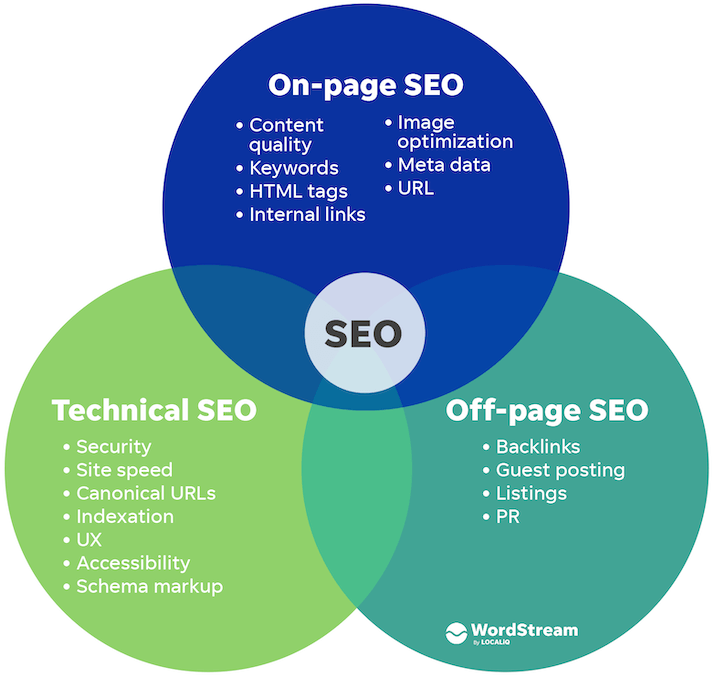 Technical SEO vs. on-page SEO vs. off-page SEO
Today, we’ll focus on the first six checks for a quick technical SEO audit.
We have articles on other SEO aspects, too!
Technical SEO vs. on-page SEO vs. off-page SEO
Today, we’ll focus on the first six checks for a quick technical SEO audit.
We have articles on other SEO aspects, too!
- Our 10-step SEO audit covers both technical SEO and content optimization.
- Our on-page SEO checklist has everything you need for blog posts and web pages.
Technical SEO Audit Checklist:
Here are the six steps in our technical SEO audit guide:
- Ensure your site is crawlable
- Verify your site is indexable
- Examine your sitemap
- Guarantee mobile-friendliness
- Evaluate page speed
- Identify duplicate content
Let’s get started! RELATED: The Complete Website Audit Checklist (in One Epic Google Sheet)
1. Is your website crawlable?
Producing pages of excellent content is pointless if search engines can’t crawl and index them. Begin by inspecting your robots.txt file, the first thing any web crawler checks when visiting your website. This file dictates which website sections should and shouldn’t be crawled by “allowing” or “disallowing” certain user agent behavior.
Your robots.txt file is located at yourwebsite.com/robots.txt. It’s publicly accessible by adding /robots.txt to the end of any root domain. Here’s an illustration from the Hallam website:

We observe Hallam requesting that any URLs beginning with /wp-admin (the website’s backend) should not be crawled. By specifying where user agents are not permitted, you conserve bandwidth, server resources, and your crawl budget. You also prevent unintentionally “disallowing” search engine bots from crawling crucial sections of your website. Since the robots.txt file is the first thing a bot encounters, it’s also best practice to link to your sitemap.
With Google’s robots.txt tester., you can edit and test your robots.txt file.
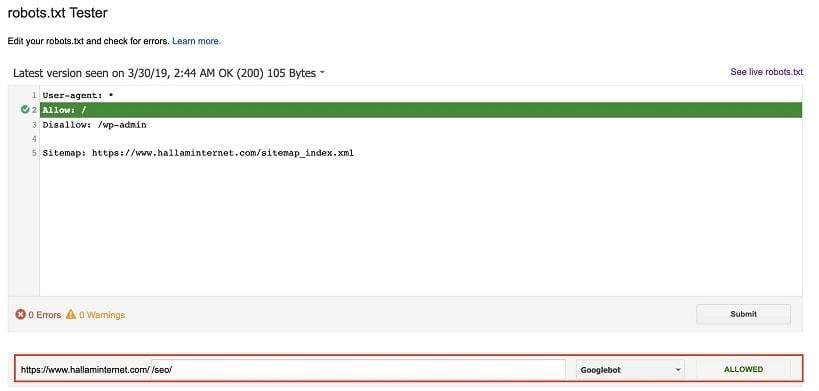
This tool allows you to input any site URL to check its crawlability and detect errors or warnings in your robots.txt file.
While Google has effectively transferred most crucial elements of the old Search Console to the new version, many digital marketers find the new version less functional, especially for technical SEO. The crawl stats section in the old Search Console, still viewable at the time of writing, remains vital for understanding how your site is being crawled.
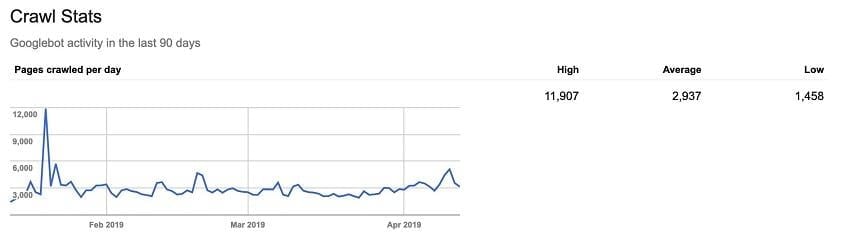
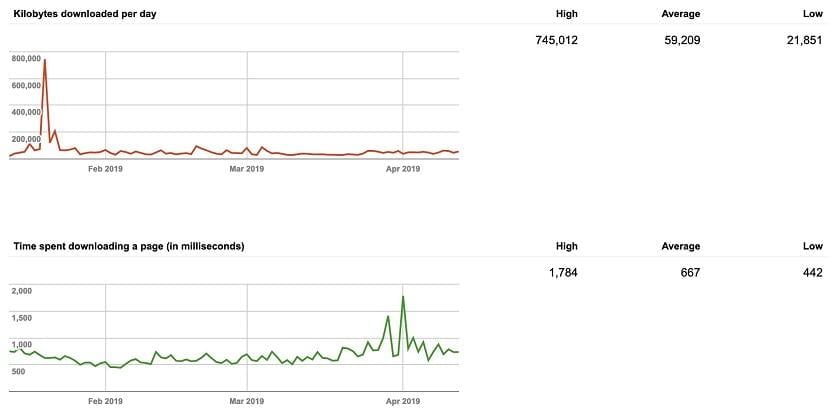
This report displays three key graphs with data from the past 90 days: pages crawled per day, kilobytes downloaded per day, and time spent downloading a page (in milliseconds). These metrics summarize your website’s crawl rate and its interaction with search engine bots. A consistently high crawl rate is ideal, indicating frequent visits by search engine bots and a website that is quick and easy to crawl. Significant fluctuations might point to broken HTML, outdated content, or an overly restrictive robots.txt file. High numbers for time spent downloading a page mean Googlebot is taking too long to crawl and index your site.
Crawl errors appear in the new Search Console’s coverage report.
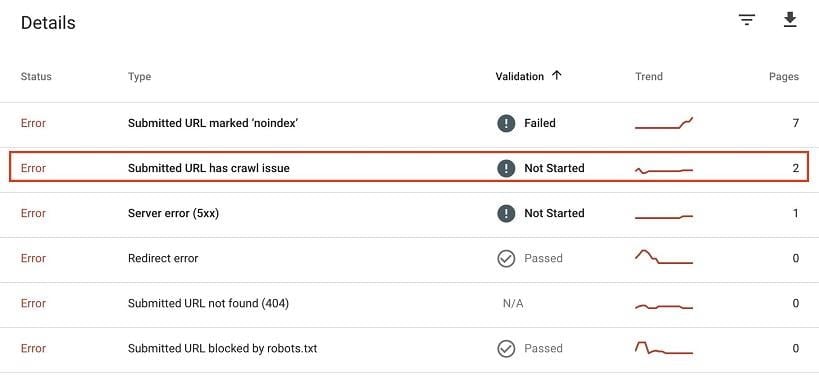
Clicking on these errors highlights pages with crawl problems. Ensure these aren’t critical pages for your website and address the underlying issue promptly.
For substantial crawl errors or inconsistencies in either the crawl stats or coverage reports, consider a log file analysis. While accessing and analyzing raw server log data can be challenging, it provides a granular understanding of which pages are crawlable, prioritized pages, crawl budget waste, and server responses bots encounter while crawling your website. Is your site optimized? Get a free SEO audit with our website grader.
2. Is your website indexable?
Once you’ve analyzed Googlebot’s ability to crawl your site, the next step is determining if those pages are being indexed. Several methods can help with this.
1. Using the Search Console coverage report
Returning to the Google Search Console coverage report, we can view the status of every page on the website.
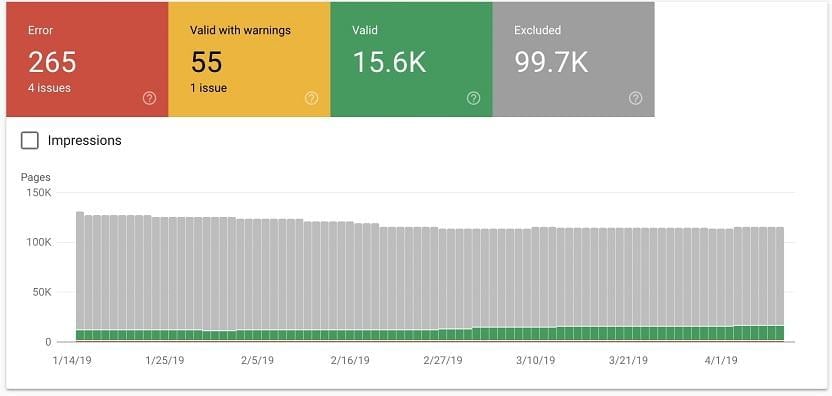
This report shows:
- Errors: Redirect errors, 404s.
- Valid with warnings: Indexed pages with associated warnings.
- Valid: Successfully indexed pages.
- Excluded: Pages excluded from indexing, including reasons such as redirects or robots.txt blocks.
You can also use the URL inspection tool to analyze specific URLs. This is helpful for checking if newly added pages are indexed or troubleshooting URLs experiencing traffic drops.
2. Using a crawl tool (like Screaming Frog)
Another effective way to check your website’s indexability is by performing a crawl. Screaming Frog is a powerful and versatile crawling software. Depending on your website’s size, you can use the free version (500 URL crawl limit, limited features) or the paid version (£149 per year, no crawl limit, advanced features, APIs).
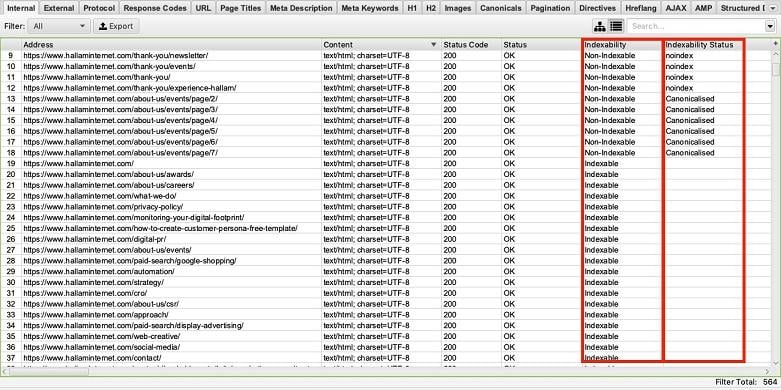
Once the crawl is complete, two columns related to indexing appear.
- Indexability: Indicates if the URL is “Indexable” or “Non-Indexable.”
- Indexability Status: Explains why a URL is non-indexable. For example, it might be canonicalized to another URL or have a no-index tag.
This SEO tool excels at bulk auditing, revealing which pages are indexed (and thus appear in search results) and which are not. Sort the columns to spot irregularities. Using the Google Analytics API helps identify important pages for indexability checks.
3. Searching on Google
Lastly, the simplest way to determine how many pages are indexed is using the site:domain Google search parameter. Type site:yourdomain in the search bar and press Enter. The results will display every page on your site indexed by Google. Here’s an example:
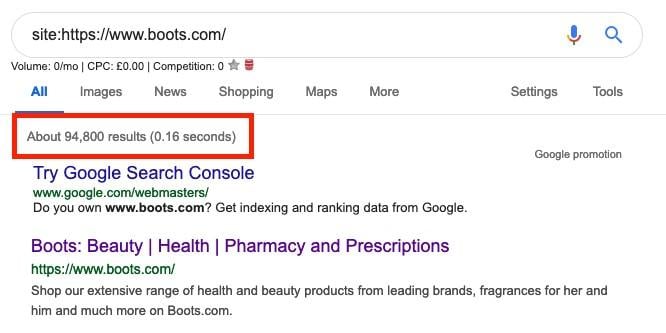
This shows that boots.com has approximately 95,000 indexed URLs. This method provides a rough estimate of how many pages Google has stored. A significant discrepancy between this number and your expected page count warrants further investigation:
- Is the HTTP version of your site still indexed?
- Do you have duplicate indexed pages that need canonicalization?
- Are large portions of your website that should be indexed not appearing?
These three techniques offer valuable insights into how Google indexes your website, allowing you to make necessary adjustments.
3. Reviewing your sitemap
The importance of a well-organized and comprehensive sitemap for SEO cannot be overstated. Your XML sitemap acts as a guide for Google and other crawlers to understand and rank your web pages.
Here are key elements of an effective sitemap:
- Proper formatting as an XML document.
- Adherence to XML sitemap protocol.
- Inclusion of canonical URL versions only.
- Exclusion of “noindex” URLs.
- Inclusion of all new or updated pages.
The Yoast SEO plugin can automatically generate an XML sitemap. Screaming Frog offers a detailed sitemap analysis tool, showing URLs in your sitemap, missing URLs, and orphaned URLs.
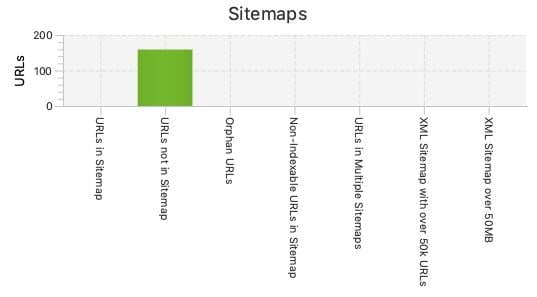
Ensure your sitemap lists your most important pages, excludes those you don’t want Google to index, and has a correct structure. After any changes, resubmit your sitemap to Google Search Console. RELATED: Use our website maintenance checklist to keep your site in top shape.
4. Ensuring your website is mobile-friendly
Last year Google announced the roll out of mobile-first indexing. Instead of relying on desktop versions for ranking and indexing, Google shifted to using mobile versions. This reflects the evolving ways users access online content. Since 52% of global internet traffic now originates from mobile devices, a mobile-friendly website is crucial.
Google’s Mobile-Friendly Test is a free tool that checks your website’s mobile responsiveness and user-friendliness. By entering your domain, you can see how the page renders on mobile and if it’s considered mobile-friendly.
It’s also vital to manually check your website on your phone, navigating through key conversion paths and identifying any errors. Ensure all contact forms, phone numbers, and essential service pages work correctly. On a desktop, you can right-click and “inspect” the page for a closer look.
If your website isn’t mobile-friendly, address this immediately (especially considering the 2021 mobile-first indexing update). Many competitors have already adapted, and delaying further puts you at a disadvantage. Don’t lose valuable traffic and potential conversions by neglecting this aspect.
For a deeper dive, read our post on mobile-first indexing.
5. Auditing page speed
Page speed is now a ranking factor. For Google, a website that’s fast, responsive, and user-friendly is paramount in 2019.
Numerous tools can assess your website’s speed. Let’s explore some prominent options and recommendations.
Google PageSpeed Insights
Google PageSpeed Insights is another powerful and free Google tool. It scores your website as “Fast,” “Average,” or “Slow” for both mobile and desktop, offering suggestions for improvement.
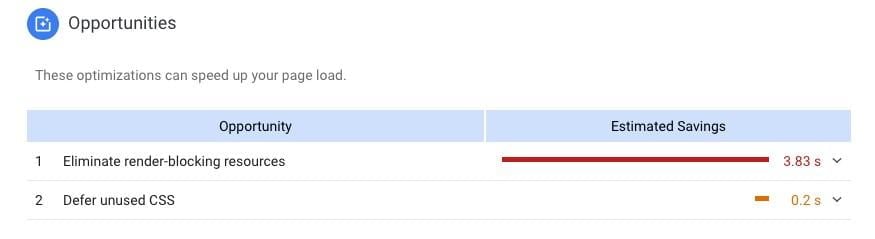
Test your homepage and key pages to identify areas needing improvement and optimize your website speed.
Remember that “page speed” for digital marketers refers not just to user loading times but also to how easily and quickly search engines can crawl the website. Minifying and bundling CSS and Javascript files are best practices, as they impact both user experience and search engine crawling. Relying solely on visual checks isn’t enough; utilize online tools to analyze page loading for both humans and search engines.
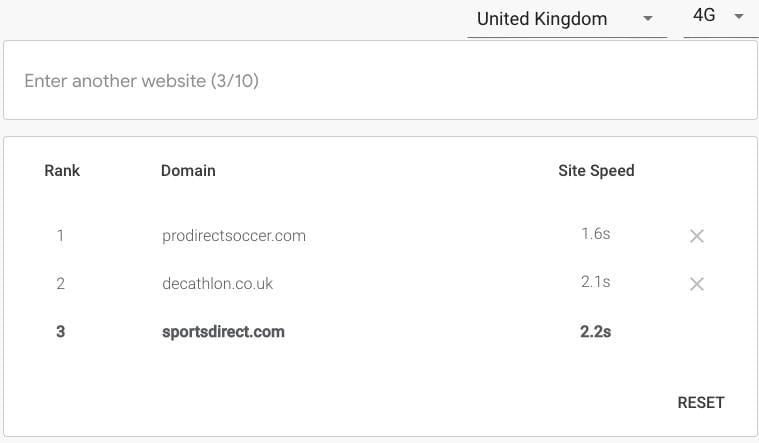
Underscoring the significance of mobile site speed, Google offers another free tool specifically for this purpose. Test My Site provides in-depth analysis of your mobile website, including: Speed on 3G and 4G connections
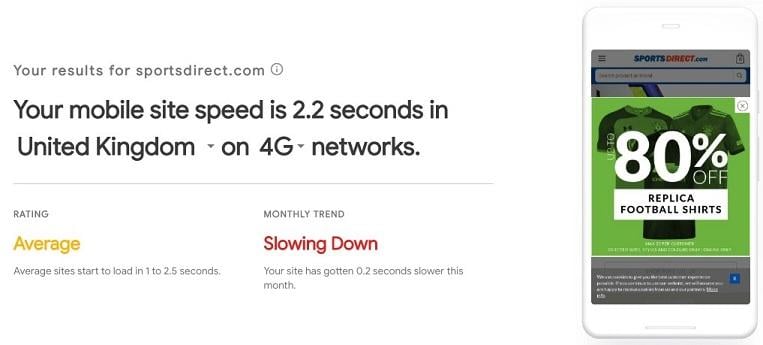
This includes your speed in seconds, rating, and whether it is improving or declining.
Tailored fixes for individual pages
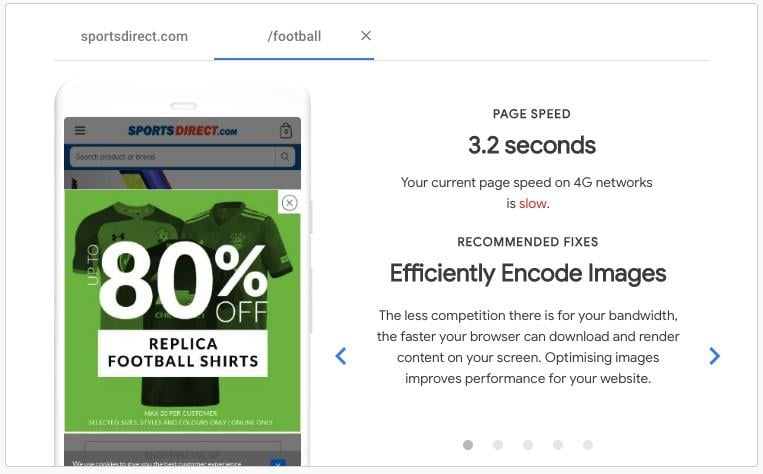
Benchmarking against up to 10 competitors
Crucially, the impact of site speed on revenue
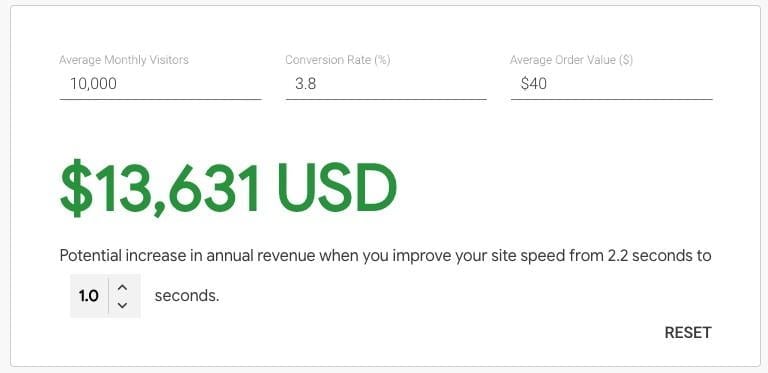
This is particularly important for e-commerce sites, as it highlights potential revenue lost due to slow mobile site speed and the positive impact even minor improvements can have.
All of this is conveniently summarized in a free, easy-to-understand report.
Google Analytics
Google Analytics also provides valuable insights into improving site speed. The site speed section under Behavior > Site Speed offers a wealth of data, including page performance across different browsers and countries. Comparing this with your page views helps prioritize optimization efforts.

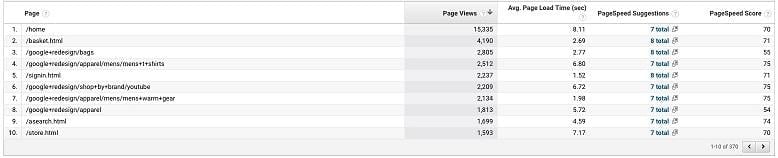
Many factors influence page load speed. After conducting your research, consider these common solutions:
- Image optimization
- Fixing bloated Javascript code
- Reducing server requests
- Implementing effective caching
- Ensuring a fast server
- Using a Content Delivery Network (CDN)
6. Duplicate content review
Finally, let’s examine duplicate content on your website. As most digital marketers know, duplicate content is detrimental to SEO. While there’s no Google penalty for it, Google dislikes multiple copies of the same information. They offer little value to users, and Google struggles to determine which page to rank, often favoring a competitor’s page.
Here’s a quick check using Google search parameters. Enter “info:www.your-domain-name.com.”
If you see the following message on the last page of search results, you likely have duplicate content:

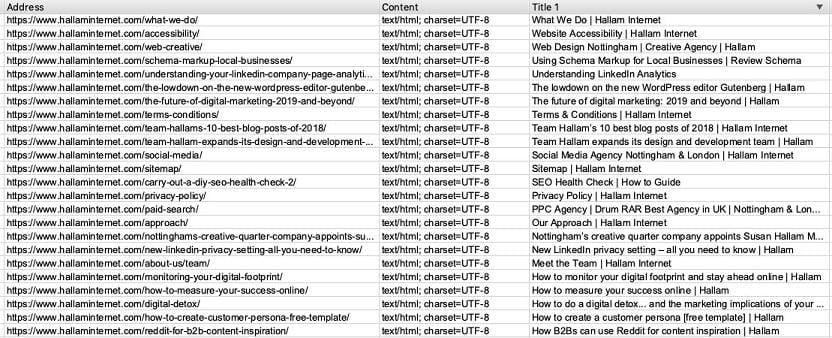
If so, run a Screaming Frog crawl and sort by Page Title to pinpoint duplicate pages on your website.
Launching your technical SEO audit
These fundamental aspects of technical SEO should be implemented by any competent digital marketer. The exciting part is how much deeper technical SEO can go. It might seem daunting, but after your initial audit, you’ll be eager to uncover further website improvements. These six steps are a great starting point for any digital marketer to ensure their website effectively caters to search engines. Best of all, they’re free, so get started now!