Digital marketing offers a significant advantage over traditional offline methods: the ability to track nearly every aspect of your strategy. Free tools like Google Analytics provide a wealth of data on your website’s performance, giving you clear insights into the effectiveness of your SEO efforts.

Image source However, the sheer volume of data can be overwhelming, leading many businesses to struggle with identifying the most relevant SEO metrics. This article will guide you through:
- Nine essential SEO metrics and their significance.
- Two metrics to reconsider or view differently.
- Locating these metrics in Google Analytics and strategies for improvement By monitoring the right metrics, you gain a precise understanding of your performance, enabling continuous optimization and ultimately boosting rankings and ROI.
9 crucial SEO metrics to monitor
Evaluating your SEO strategy’s success or conducting an SEO audit involves numerous trackable metrics. To simplify the process, here are nine key SEO metrics and how to track them.
1. Organic traffic
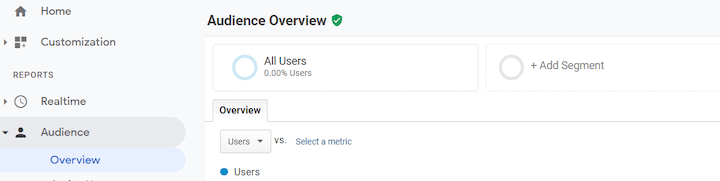
This fundamental metric represents the traffic your website receives from search engine results pages (SERPs) without paid advertising. While your total traffic originates from various sources (search engines, social media, direct visits, other websites), focusing on organic traffic reveals your website’s visibility in search results for keywords relevant to your business and industry. A successful SEO strategy should result in a consistent increase in visitors from search results. To track organic traffic in Google Analytics, access your dashboard and choose “Add Segment” in the default Audience Overview.
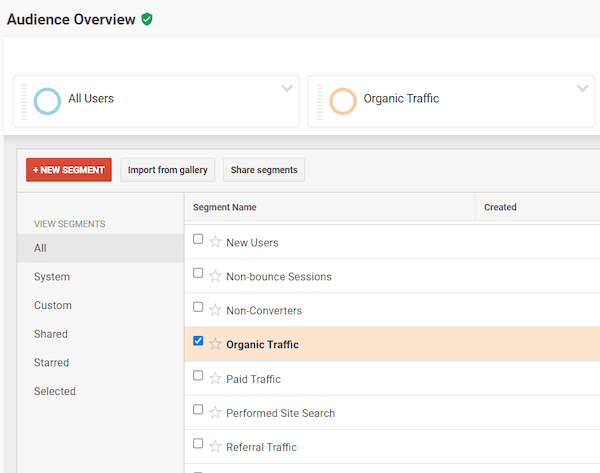
Select “Organic Traffic” and click “Apply”.
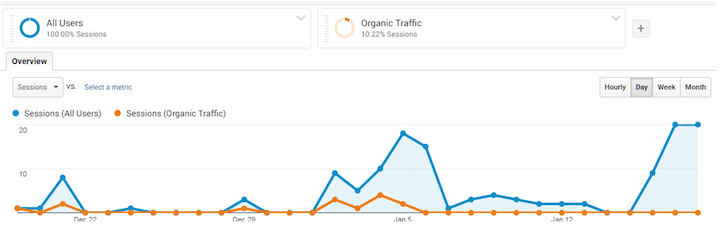
Now, you can view organic traffic as a proportion of your overall traffic.
2. Click-through rate (CTR)
Organic CTR reflects the percentage of users who click on your website link after encountering it in the SERPs. For instance, if 1,000 users see your listing and 100 click through, your CTR is 10%. This metric indicates the effectiveness of your listing (title, meta description, URL) in attracting and engaging your target audience.

A low CTR might suggest an unengaging title or meta description, or content that doesn’t align with user intent. Consider these strategies to enhance your organic CTR. Monitor CTR directly in Google Search Console under the “Performance” tab.
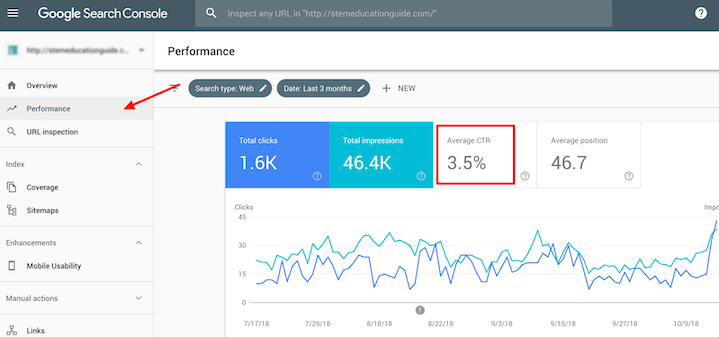
Analyze CTR by page, query, or device. Monitoring CTR by page offers valuable insights into content that isn’t attracting sufficient clicks from SERPs. Explore additional ways to utilize Google Search Console for SEO improvement.
3. Exit rate
Exit pages are the final pages visitors view before exiting your website. Identifying your top exit pages helps pinpoint where users lose interest and navigate away. These pages often indicate areas for improvement. If a significant portion of traffic exits after visiting a specific page, it suggests potential issues with the page content or structure. To track exit percentages for individual pages, navigate to “Behavior” > “Site Content” > “All Pages”.
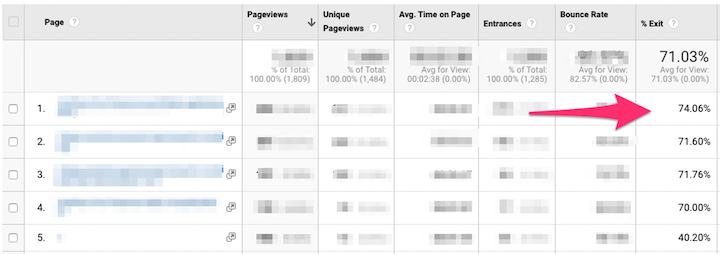
Reduce exit rates by:
- Ensuring clarity in page layout and content structure.
- Incorporating clear internal links and calls to action to guide visitors to relevant content.
- Adding high-quality content, including visuals (images and videos) to enhance engagement.
4. Pages per session
Pages per session, a crucial on-site user engagement metric, indicates the average number of pages visited before users leave your site. A higher number signifies increased engagement and longer visits, which is generally desirable. In Google Analytics, go to “Acquisition” > “All Traffic” > “Channels” to view pages per session for different traffic sources.
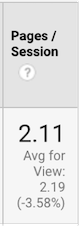
A low number may imply that your content lacks engagement or relevance, discouraging visitors from exploring further. Alternatively, it could indicate user-unfriendliness in your site navigation. Consider the tips mentioned for top exit pages to address this.
5. Average page load time
Site speed is a crucial SEO ranking factor (especially for both desktop and mobile) and significantly impacts both rankings and user experience.
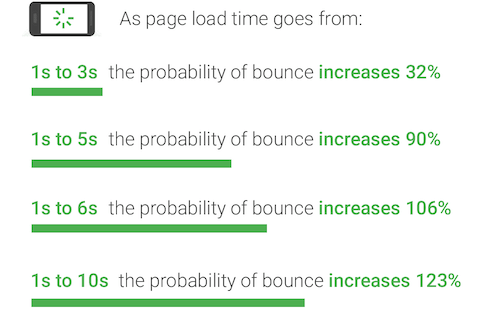
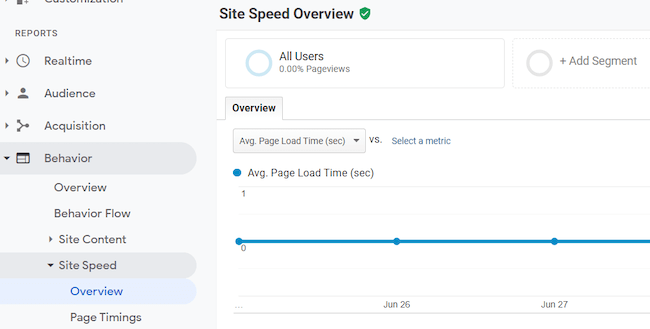
Image source Average page load time refers to the time required for all page content to display. Find this metric under “Behavior” > “Site Speed.” You can analyze the average load time for all pages or individual pages.
6. Core Web Vitals
Google increasingly prioritizes websites that deliver an excellent user experience (UX) with higher rankings. Page load speed plays a vital role in UX. Traditional performance metrics like load time and DOMContentLoaded, while easy to measure, don’t always accurately reflect user experience. Focusing solely on average page load time optimization may not guarantee a positive UX. In 2020, Google introduced Core Web Vitals as a more granular, UX-focused approach to measuring page load time. These user-centric metrics provide deeper insights. Here’s a concise explanation of the three Core Web Vitals as per the official Chromium blog:
- First Input Delay (FID) quantifies responsiveness, measuring how quickly a page responds to user interaction.
- Cumulative Layout Shift (CLS) assesses visual stability, measuring the degree of unexpected layout shifts during page loading.
- Largest Contentful Paint (LCP) measures perceived load speed, marking the point when the primary content has likely loaded.
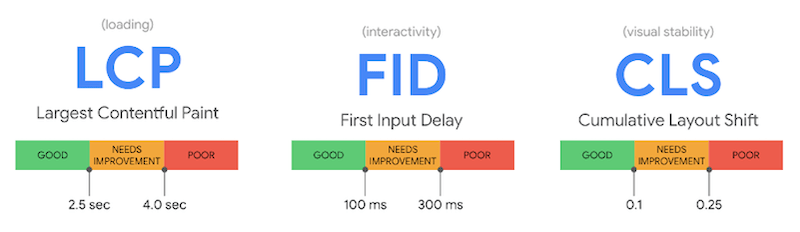
Google Search Console’s “Enhancements” section displays your website’s Core Web Vitals performance. You can also utilize the Google’s PageSpeed Insights tool for accessing these metrics and obtaining recommendations for improvement. Explore five ways to enhance your Core Web Vitals here.
7. Backlinks and referring domains
Backlinks are fundamental ranking signals for Google. A recent study of over 11 million Google search results highlights a strong correlation between rankings and the number of referring domains. Backlinks encompass all external links pointing to your site, while referring domains represent the number of unique domains from which these links originate. Prioritize quality over quantity when it comes to backlinks. Ten high-quality, authoritative backlinks outweigh 100 from average or low-quality sources. While all backlinks contribute to SEO, links from new referring domains tend to carry more weight than those from domains already linking to you.
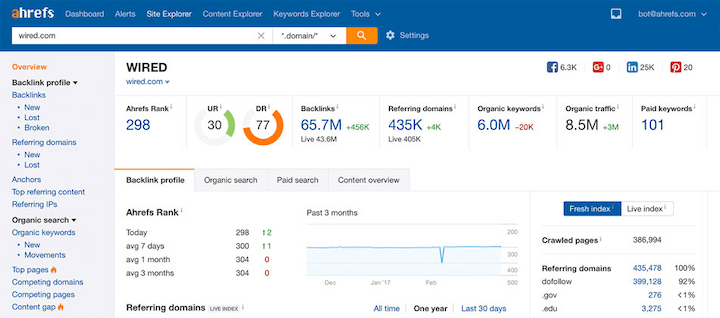
Ahrefs serves as an excellent SEO tool for tracking backlinks and referring domains. It reveals linking websites, linked pages, and the domain rating of referring domains.
8. Top keywords ranked
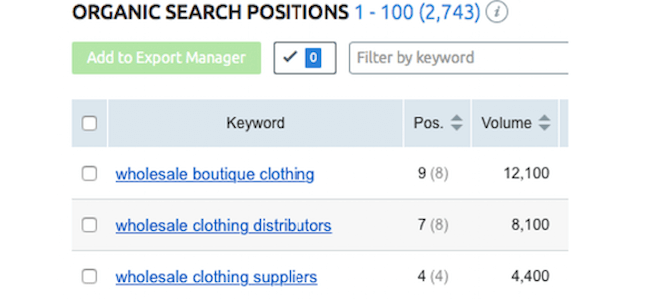
As you optimize your website for target keywords, monitor their ranking progress. Tracking ranked keywords provides insights into your current organic search visibility and guides decisions on optimizing existing keywords or targeting new ones. Utilize a position tracking tool like SEMrush to monitor keyword rankings. The Organic Search Positions report illustrated below helps visualize ranking changes and overall search visibility improvement over time.
9. Pages crawled per day
A faster crawl rate allows Googlebot to index your site more efficiently, potentially leading to higher SERP rankings. In Google Search Console, navigate to Settings > Crawl stats to view the daily number of pages crawled by Googlebot over the past 90 days.
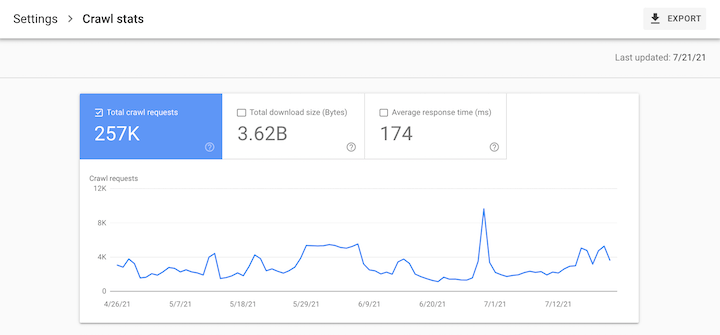
If you have numerous pages but only a fraction are crawled, it might indicate an issue with your crawl budget. Googlebot avoids over-consuming system resources, so it might not crawl your entire website if it encounters limitations. While a higher crawl rate doesn’t guarantee better rankings, it’s a technical SEO metric worth monitoring and optimizing.
2 SEO metrics to reconsider
The abundance of data in modern analytics tools can tempt you to view everything as a KPI. However, misinterpreting data can be misleading. Consider these two metrics with caution.
1. Conversions
While debatable, relying solely on the number of conversions within a specific timeframe as a performance indicator can be misleading, as it doesn’t tell the whole story. For instance, if yesterday saw 10 purchases and today only four, does it mean your website is performing poorly? Not necessarily. Factors like higher product prices or increased average order value today could explain the lower conversion count despite positive performance. Moreover, “conversion” holds different meanings for different websites, from newsletter sign-ups to webinar registrations. Not all conversions translate directly to revenue. You could have numerous conversions without generating substantial income. In essence, conversions in SEO encompass various actions beyond purchases. If a conversion doesn’t ultimately contribute to revenue, it shouldn’t be a primary metric.
2. Bounce rate
Bounce rate refers to the percentage of visitors who exit your website after viewing only one page, without interacting with internal links. Relying on site-wide average bounce rate as a primary SEO metric can be deceptive due to its varied interpretations. While a high bounce rate might signal irrelevant content, poor design, or navigation issues, it could also indicate that your content effectively and immediately satisfies user intent. For instance, a visitor landing on a blog post, reading it fully, and leaving satisfied with the information would still be considered a “bounce,” despite finding value in the content. Analyzing bounce rate at a page level can be insightful, but using site-wide average bounce rate as a key metric can be misleading.
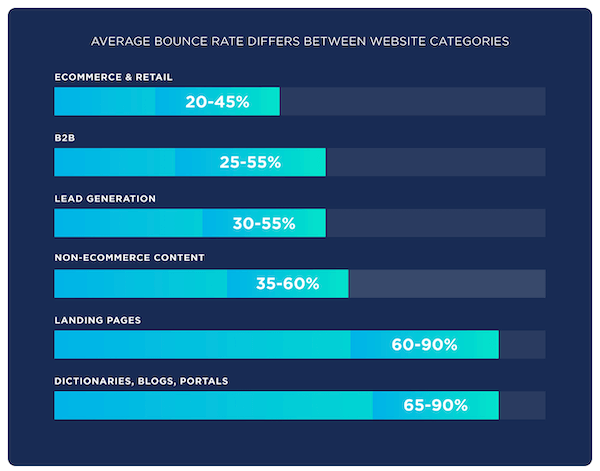
Image source Essentially, if bounce rates are so variable, fluctuations in average bounce rate alone don’t provide a clear indication of positive or negative performance.
Start tracking these SEO metrics today
In the ever-evolving landscape of SEO, staying informed about your metrics is crucial. If you haven’t already, start tracking the nine key metrics discussed above. Tools like Google Analytics, Search Console, and Ahrefs (or SEMrush) provide accessible means to monitor these metrics and make continuous improvements. Equip yourself with the right SEO tools and begin tracking your progress today.
- Organic traffic
- Click-through rate
- Exit rate
- Pages per session
- Average page load time
- Core Web Vitals
- Backlinks and referring domains
- Keyword rankings
- Pages crawled per day Need assistance with your SEO? Explore our comprehensive range of digital marketing solutions!