It’s understandable why many developers see testing as an unavoidable chore that drains their time and effort: testing can be repetitive, inefficient, and overly complex.
My initial encounter with testing was far from ideal. I was part of a team with rigorous code coverage standards. The process involved implementing a feature, debugging it, and writing tests to achieve complete code coverage. Our team relied solely on unit tests, lacking integration tests, and these unit tests involved numerous manually initialized mocks. Most of them tested simple manual mappings while utilizing a library for automatic mappings. Since each test aimed to assert every available property, any modification would disrupt numerous tests.
I developed a dislike for working with tests as they were seen as a time-consuming obligation. However, I remained curious about the confidence testing offered and the ability to automate checks after every small change. I began studying and practicing, discovering that tests, when done correctly, could be both valuable and enjoyable.
This article outlines eight automated testing best practices that I wish I had known earlier in my career.
The Importance of an Automated Test Strategy
Automated testing often has a future-oriented focus, but implementing it correctly yields immediate advantages. Utilizing tools that enhance your workflow saves time and makes your work more enjoyable.
Consider developing a system to retrieve purchase orders from your company’s ERP and submit them to a vendor. You have access to past item prices in the ERP, but current prices might differ. You need to manage whether to place orders at higher or lower prices. You have stored user preferences and are writing code to handle price changes.
How would you verify your code’s functionality? You’d likely:
- Set up a test order in the development ERP instance (assuming it’s configured).
- Execute your application.
- Choose the order and initiate the order placement process.
- Retrieve data from the ERP database.
- Fetch current prices from the vendor API.
- Manually adjust prices in the code to create specific conditions.
You pause at breakpoints, stepping through a single scenario. However, numerous scenarios exist:
| Preferences | ERP price | Vendor price | Should we place the order? | |
|---|---|---|---|---|
| Allow higher price | Allow lower price | |||
| false | false | 10 | 10 | true |
| (Here there would be three more preference combinations, but prices are equal, so the result is the same.) | ||||
| true | false | 10 | 11 | true |
| true | false | 10 | 9 | false |
| false | true | 10 | 11 | false |
| false | true | 10 | 9 | true |
| true | true | 10 | 11 | true |
| true | true | 10 | 9 | true |
Bugs could lead to financial losses, reputational damage, or both. You must test multiple scenarios repeatedly. Manual execution would be tedious, which is where tests come in.
Tests enable context creation without unreliable API calls, eliminating repetitive interactions with outdated interfaces common in legacy ERP systems. Define the context for the unit or subsystem, and debugging, troubleshooting, or scenario exploration become instantaneous—run the test and return to your code. I prefer setting up an IDE keybinding to rerun the previous test for immediate, automated feedback while coding.
1. Cultivate the Right Mindset
Compared to manual debugging and self-testing, automated tests are more efficient from the outset, even before writing any test code. After confirming expected code behavior—through manual testing or, for complex modules, debugger-assisted testing—use assertions to define expected outcomes for input parameter combinations.
With passing tests, you’re almost ready to commit, but not quite. Prepare for code refactoring, as the initial working version might lack elegance. Would you refactor without tests? It’s doubtful because you’d repeat all manual steps, potentially dampening your enthusiasm.
And what about the future? During refactoring, optimization, or feature additions, tests guarantee consistent module behavior after changes, fostering lasting confidence and empowering developers for future tasks.
Viewing tests as a burden or something solely for code reviewers or leads is counterproductive. Tests are tools that directly benefit developers. We value working code and dislike wasting time on repetitive tasks or bug fixes.
Recently, while refactoring my codebase, I instructed my IDE to remove unused using directives. Surprisingly, tests revealed failures in my email reporting system. It was a legitimate failure—the cleanup removed using directives in my Razor (HTML + C#) email template code, preventing the template engine from generating valid HTML. I hadn’t anticipated such a minor operation impacting email reports. Testing saved me hours of debugging right before release when I assumed everything was functional.
Of course, tools require proper usage to avoid metaphorical injuries. Context definition might seem tedious, tests might appear maintenance-heavy, and preventing staleness might seem challenging. These are valid concerns that we’ll address.
2. Choose the Appropriate Test Type
Developers often develop an aversion to automated tests when forced to mock numerous dependencies just to verify their invocation. Alternatively, they encounter high-level tests requiring extensive application state reproduction to check variations within a small module. These patterns are unproductive and tedious but avoidable by leveraging different test types as intended. (Tests should be practical and enjoyable!)
Readers should understand unit tests and their implementation, along with familiarity with integration tests—if not, it’s worth brushing up on these concepts.
Numerous testing types exist, but these five commonly used types form a highly effective combination:

- Unit tests isolate and test individual modules by directly calling their methods. Dependencies are mocked, not tested.
- Integration tests assess subsystems. Direct method calls are used, but dependencies are crucial and not mocked, using real (production) dependent modules. In-memory databases or mocked web servers are acceptable as infrastructure mocks.
- Functional tests evaluate the entire application without direct calls. Interaction occurs through the API or user interface—these are end-user perspective tests. However, infrastructure remains mocked.
- Canary tests resemble functional tests but utilize production infrastructure with a limited action set to ensure newly deployed applications function correctly.
- Load tests are similar to canary tests but employ real staging infrastructure and a smaller set of repeated actions to assess application behavior under heavy load.
Working with all five testing types from the start isn’t always necessary. In most cases, the first three suffice.
Let’s examine each type’s use cases to help you choose the right ones.
Unit Tests
Recall the example involving varying prices and handling preferences. It’s suitable for unit testing as we’re focused solely on internal module behavior with significant business implications.
The module has numerous input parameter combinations, and we need valid return values for each valid combination. Unit tests excel at ensuring validity due to direct access to function or method input parameters. You avoid writing excessive test methods to cover all combinations. Many languages allow defining a parameterized method accepting required arguments and expected results, eliminating test method duplication. Test tooling then provides different value and expectation sets for this method.
Integration Tests
Integration tests are ideal when examining module interaction with dependencies, other modules, or infrastructure. Direct method calls are used, but without submodule access, making exhaustive scenario testing impractical.
I typically prefer one success and one failure scenario per module.
Integration tests effectively check dependency injection container building, processing pipeline result accuracy, or complex data reading and conversion from databases or external APIs.
Functional Tests
Functional tests provide the highest confidence in application functionality by verifying error-free application startup. While testing without direct class access requires more effort initially, writing the first few tests demonstrates its manageability.
Run the application using command-line arguments if needed, then interact with it like an end-user: calling API endpoints or clicking buttons. UI testing isn’t difficult either: major platforms offer tools to locate UI elements.
Canary Tests
Functional tests confirm application functionality in testing environments, but what about production? Imagine working with multiple external APIs and needing a dashboard for their statuses or understanding how your application handles incoming requests. These are common canary test use cases.
They operate by briefly interacting with the live system without impacting external systems. For instance, you might register a new user or check product availability without placing an order.
Canary tests ensure that major components function cohesively in production, avoiding issues like credential problems.
Load Tests
Load tests determine if your application can handle numerous simultaneous users. They resemble canary and functional tests but run on dedicated staging environments similar to production.
Importantly, load tests don’t use real external services, as these providers might object to external load testing on their production systems, potentially leading to additional charges.
3. Separate Test Types
When designing your automated test plan, separate each test type for independent execution. While requiring extra organization, this separation is valuable due to potential issues arising from mixing tests.
These tests differ in:
- Purpose and core concepts (separation establishes clear distinctions for anyone reviewing the code, including your future self).
- Execution times (running unit tests first allows for faster feedback loops when tests fail).
- Dependencies (loading only necessary dependencies within a test type enhances efficiency).
- Required infrastructure.
- Programming languages (in some cases).
- Positioning within the continuous integration (CI) pipeline or outside it.
Note that most languages and tech stacks allow grouping, for instance, all unit tests within subfolders named after functional modules. This promotes convenience, reduces friction when adding modules, simplifies automated builds, minimizes clutter, and streamlines testing.
4. Automate Test Execution
Imagine writing tests, only to discover they’re failing weeks later after pulling your repository.
This highlights that tests are code requiring maintenance, ideally right before assuming you’re finished and wanting to verify functionality. You possess the necessary context to fix code or modify failing tests more effectively than a colleague working on a different subsystem. Since this moment only exists in your mind, automate test execution after pushing to the development branch or creating a pull request.
This ensures a consistently valid main branch or provides clear status indicators. An automated build and test pipeline—a CI pipeline—helps by:
- Ensuring code buildability.
- Eliminating the infamous “It works on my machine” problem.
- Providing clear instructions for setting up development environments.
CI pipeline configuration takes time, but it identifies various issues before they impact users or clients, even when you’re the sole developer.
Once operational, CI also detects new problems before they escalate. Therefore, I recommend setting it up after writing your first test. Host your code in a private GitHub repository and utilize GitHub Actions. Public repositories offer even more options beyond GitHub Actions. For instance, my automated test plan employs AppVeyor for a project with a database and three test types.
For production projects, I prefer the following pipeline structure:
- Compilation or transpilation.
- Unit tests: fast and dependency-free.
- Database or service setup and initialization.
- Integration tests: have external dependencies but are faster than functional tests.
- Functional tests: execute the entire application after successful completion of previous steps.
Canary and load tests are excluded due to their specific requirements and are initiated manually.
5. Write Only Essential Tests
While aiming for 100% code coverage with unit tests is a common strategy, it can be time-consuming, unproductive, and fail to instill confidence. If you’re familiar with the “testing pyramid,” you might believe that unit tests should cover all code, with higher-level tests covering a subset.
I see no need to write unit tests solely to verify that mocked dependencies are called in a specific order. This involves configuring multiple mocks and verifying calls without guaranteeing module functionality. I typically opt for an integration test using real dependencies and only verifying the result, providing confidence in the tested module’s pipeline.
Generally, I write tests that simplify both initial functionality implementation and subsequent maintenance.
For most applications, striving for 100% code coverage introduces excessive tedious work, diminishing the enjoyment of testing and programming. As Martin Fowler’s Test Coverage states:
Test coverage is a useful tool for finding untested parts of a codebase. Test coverage is of little use as a numeric statement of how good your tests are.
Therefore, I recommend installing and running a coverage analyzer after writing tests. The report highlighting code lines illuminates execution paths and identifies uncovered areas needing attention. Examining getters, setters, and facades reveals why 100% coverage isn’t always desirable.
6. Embrace the Lego Approach
Occasionally, I encounter questions like, “How do I test private methods?” The answer: you don’t. This question often signals a violation of the Single Responsibility Principle, indicating a module exceeding its intended scope.
Refactor the module and extract the crucial logic into a separate module. Don’t hesitate to increase file count, leading to code structured like Lego bricks: highly readable, maintainable, replaceable, and testable.
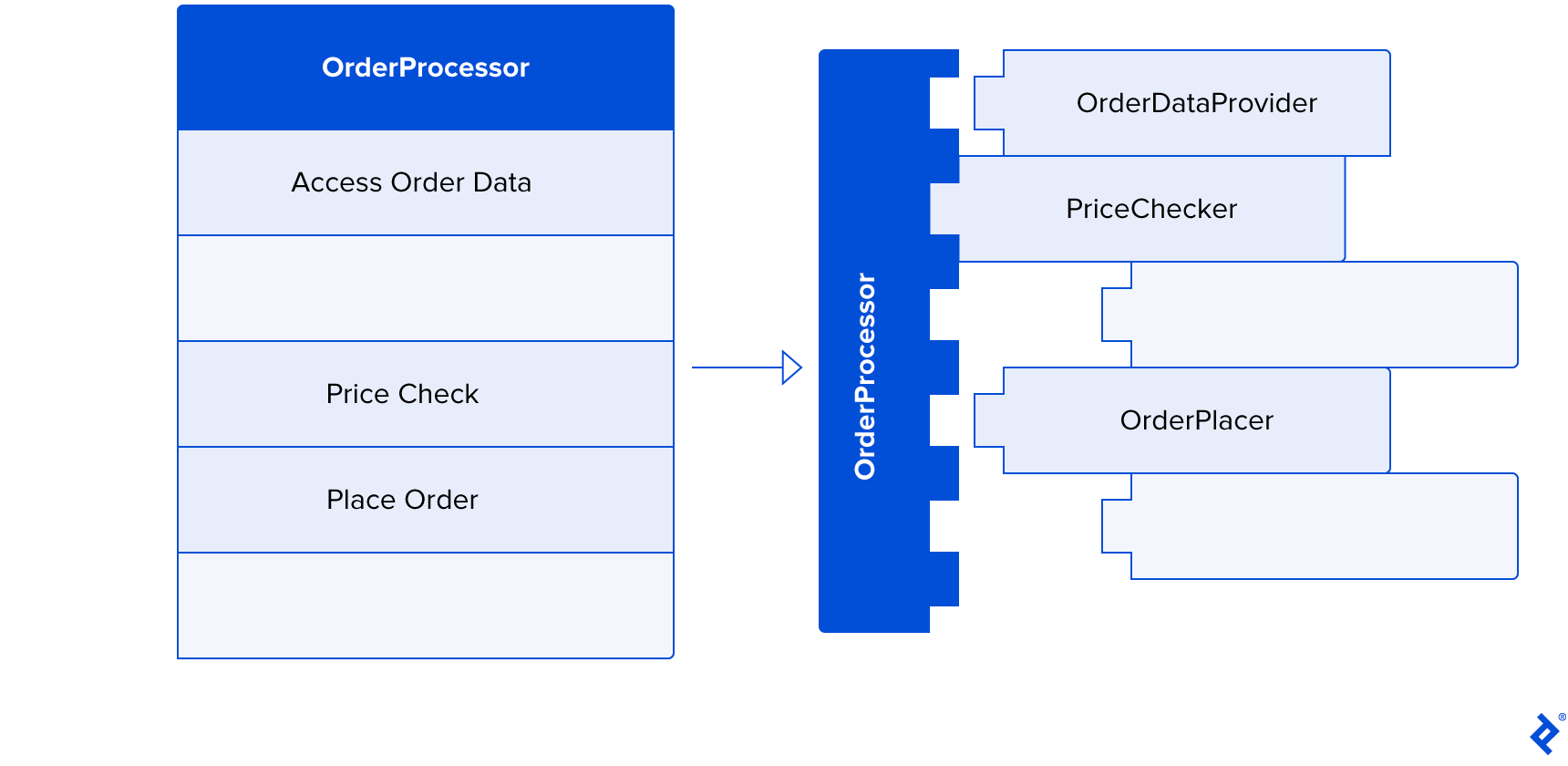
Achieving proper code structure is challenging. Here are two suggestions:
Functional Programming
Explore the principles and concepts of functional programming. Most mainstream languages like C, C++, C#, Java, Assembly, JavaScript, and Python, prioritize writing machine-readable code. Functional programming aligns better with human cognition.
While counterintuitive initially, consider this: computers handle code within a single method, utilizing shared memory for temporary values, and employing numerous jump instructions. Compilers often perform such optimizations. However, the human brain struggles with this approach.
Functional programming encourages writing pure functions without side effects, utilizing strong types, and emphasizing expressiveness. This simplifies reasoning about functions, as their sole output is the return value. The Programming Throwdown podcast episode Functional Programming With Adam Gordon Bell provides a basic understanding, while Corecursive episodes God’s Programming Language With Philip Wadler and Category Theory With Bartosz Milewski offer further insights. These podcasts significantly enhanced my programming perspective.
Test-driven Development
I highly recommend mastering TDD. The most effective learning method is practice. String Calculator Kata is an excellent way to practice with code kata. Mastering the kata takes time but allows you to internalize the TDD concept, leading to well-structured, maintainable, and testable code.
A word of caution: some TDD proponents claim it’s the only correct programming approach. However, it’s simply another valuable tool in your arsenal.
Sometimes, you need to understand how modules and processes interact without knowing the exact data or signatures. In such cases, write code until it compiles, then utilize tests for troubleshooting and debugging.
Conversely, when you know the desired input and output but struggle with implementation due to complex logic, following the TDD process and incrementally building your code is more efficient than searching for the perfect solution.
7. Maintain Test Simplicity and Focus
A well-organized codebase without distractions is a joy to work with. Apply the principles of SOLID, KISS, and DRY to tests, refactoring when necessary.
Comments like, “I dislike working in heavily tested codebases because every change requires fixing numerous tests,” indicate a high-maintenance issue caused by unfocused tests attempting to cover too much. The “Do one thing well” principle applies to tests as well: “Test one thing well”; each test should be concise and focused on a single concept. This doesn’t restrict you to one assertion per test: utilize multiple assertions when testing complex data mapping.
This focus extends beyond individual tests or test types. Imagine handling intricate logic tested with unit tests, such as mapping data from an ERP system to your structure. You also have an integration test accessing mock ERP APIs and returning the result. Avoid retesting the mapping in integration tests, as your unit test already covers it. Ensuring the result has the correct identification field usually suffices.
With Lego-like code structure and focused tests, business logic changes become less painful. Radical changes involve dropping the file and associated tests, creating a new implementation with new tests. Minor changes typically require modifying one to three tests and updating the logic. Modifying tests is acceptable; consider it this practice as double-entry bookkeeping.
Other ways to achieve simplicity include:
- Establishing conventions for test file structure, test content structure (typically Arrange-Act-Assert), and test naming; then, most importantly, consistently following these rules.
- Extracting large code blocks into methods like “prepare request” and creating helper functions for repeated actions.
- Employing the builder pattern for test data configuration.
- Using the same DI container from your main application in integration tests simplifies instantiation to
TestServices.Get(), avoiding manual dependency creation. This enhances readability, maintainability, and simplifies writing new tests due to readily available helpers.
If a test becomes overly complex, pause and reflect. Either the module or the test itself requires refactoring.
8. Leverage Tools for Efficiency
Testing involves numerous tedious tasks, such as setting up test environments, creating data objects, and configuring stubs and mocks. Fortunately, mature tech stacks offer tools to simplify these tasks.
Write your first hundred tests (if you haven’t already), then dedicate time to identify repetitive tasks and explore testing tools available for your tech stack.
Here are some tools for inspiration:
- Test runners. Prioritize concise syntax and ease of use. For .NET, I recommend xUnit (NUnit is another solid choice), while Jest is my preference for JavaScript or TypeScript. Choose the best fit for your tasks and preferences, as tools and challenges evolve.
- Mocking libraries. Options range from low-level mocks for code dependencies like interfaces to higher-level mocks for web APIs or databases. Jest’s built-in low-level mocks suffice for JavaScript and TypeScript. For .NET, I use Moq, though NSubstitute is also excellent. For mocking web APIs, WireMock.NET is enjoyable to use, replacing real APIs for troubleshooting and debugging response handling. It’s reliable and fast in automated tests. Databases can be mocked using in-memory counterparts, a feature offered by .NET’s EfCore.
- Data generation libraries. These utilities populate data objects with random data, useful when you only care about specific fields within a large data transfer object (perhaps only testing mapping correctness). They’re helpful for tests and providing random data for forms or database population. I use AutoFixture in .NET for testing.
- UI automation libraries. These act as automated users for automated tests, capable of running your application, interacting with forms, clicking buttons, reading labels, and more. Instead of relying on coordinate-based clicking or image recognition, major platforms provide tools to locate elements by type, identifier, or data, ensuring test robustness even with UI redesigns. Once configured for your workflow and CI, they’re reliable (though occasional “works on my machine” quirks might arise). I enjoy using FlaUI for .NET and Cypress for JavaScript and TypeScript.
- Assertion libraries. Most test runners include assertion tools, but independent tools like Fluent Assertions for .NET can enhance complex assertion writing with cleaner, more readable syntax. I particularly appreciate the function for asserting collection equality regardless of item order or memory address.
Finding Happiness Through Testing
Tests, especially when combined with TDD, can be guiding and confidence-boosting. They help establish clear goals, with each passing test marking progress.
The right testing approach leads to greater happiness and productivity while mitigating burnout risks. The key is viewing testing as a helpful tool (or toolset) for your daily development routine, not a burden for future-proofing your code.
Testing is an essential aspect of programming, enabling software engineers to enhance their workflows, deliver exceptional results, and optimize time utilization. Perhaps most importantly, tests contribute to greater job satisfaction, boosting morale and motivation.