It’s true that “best practices” can be an overused term. Every PPC account has unique characteristics, and assuming a one-size-fits-all approach is never the right way to go.
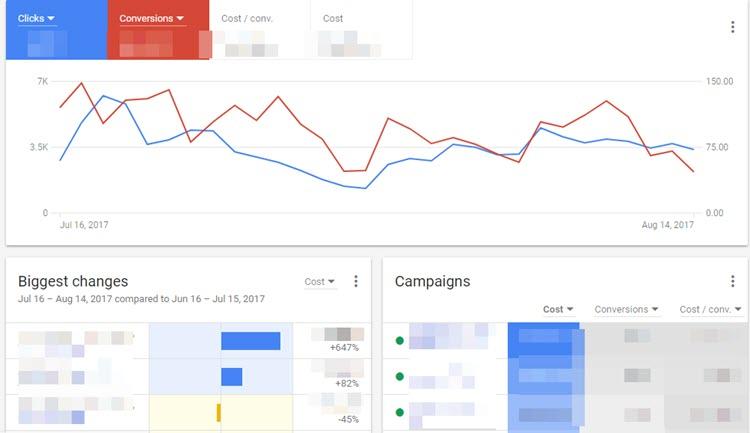
However, some tactics and strategies consistently deliver results, regardless of the account. While a testing mindset is important, certain elements don’t require constant reinvention. So, while I might not always love the phrase “best practices,” here are some strategies I believe are essential for any Display Network campaign:
- Maintain separate Search and Display Networks
- Separate remarketing audiences from new users
- Monitor ad frequency
- Thoroughly explore placement options
- Align your call to action (CTA) for optimal engagement
Let’s dive in.
1. Keep your Search and Display Networks Separate
This recommendation boils down to user intent. The Search and Display Networks engage with users in entirely different mindsets. Users visiting Google.com or its search partners (like Ask.com) actively seek information or services. Their keyword searches clearly indicate their intent.
The Display Network, however, presents a disruptive experience. When users browse websites within Google’s Display Network, such as ESPN or The New York Times, their focus is on consuming content, not viewing your ads. So, when setting up Search Network campaigns, don’t be misled by Google’s default settings.
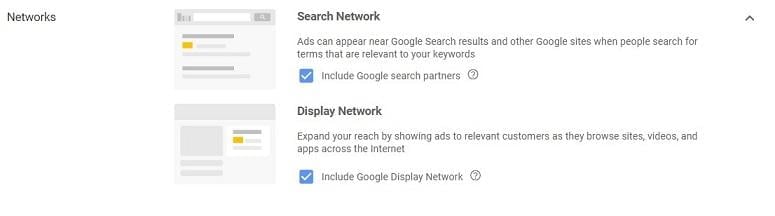
This isn’t a new tactic. Google Ads has been subtly including the Display Network within new search campaigns for years. Regardless of your company’s size or budget, separating your Search Network and Display Network campaigns is crucial. This separation offers better control over performance, budgets, and targeting, and enables more effective optimization to cater to the different user intents on each network.
2. Separate Your Remarketing Audiences From New Users
We’ve discussed the differing user intent between Search and Display Networks, but it can also vary within a single network. Users familiar with your website or YouTube videos already know your brand. You’ll likely tailor your message differently for these users, and this is where audience exclusions are valuable.
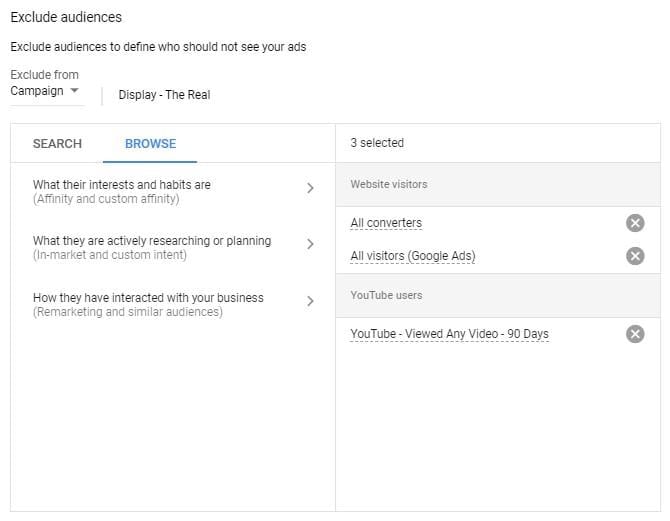
Utilize audience exclusions to distinguish remarketing campaigns from general awareness campaigns. This minimizes audience overlap and allows you to adjust budgets, bids, ads, and even landing pages to resonate with users further down the marketing funnel.
Deciding whether to separate different remarketing audiences into individual campaigns depends on factors like budget allocation for each audience and the campaign’s primary goal.
3. Monitor Frequency
Imagine this: you’re driving to work and spot a new billboard. It initially grabs your attention, but as you take the same route daily, the billboard’s impact diminishes. This principle applies to display ads as well. Eventually, both conversions and engagement may decline after a certain number of views.
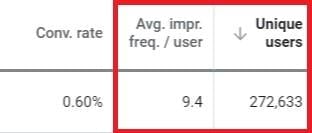
Within Google Ads, specific reach columns help monitor ad exposure and unique user views. Observe how your CTR, conversions, conversion rates, or other relevant KPIs fluctuate alongside unique user and frequency numbers.
This data informs your frequency capping settings within Display Network campaigns. In your campaign settings, locate the “Additional settings” option and expand the frequency capping section.

Advertisers can then control impression limits at the ad, ad group, or campaign level, with options for daily, weekly, or monthly limits. Remember, there’s no universal magic number; you’ll need to analyze how your targeting choices align with your ad creative’s engagement.
4. Take a Deep Dive Into Placement Options
Many still perceive the Display Network as a massive collection of websites, but it’s much more than that. When using targeting methods like keywords or topics, your display ads are placed automatically. This encompasses websites, but also extends to video and app placements.
Advertisers can also opt for managed placements, choosing specific locations for their ads. However, Google notes that if a targeted website has an equivalent app, ads may appear there as well.
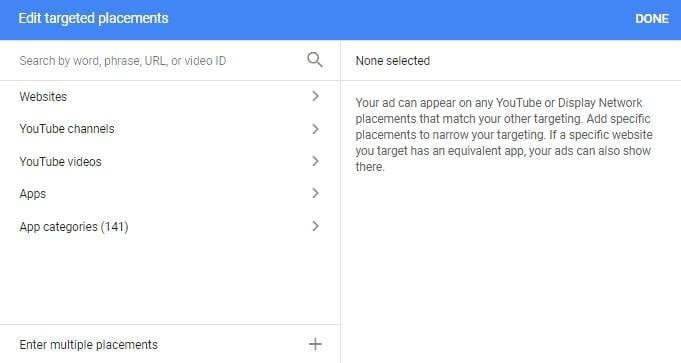
If you prefer to avoid mobile app placements altogether, Kirk Williams offers a helpful blog post on how to exclude all mobile app categories from your campaigns. This provides more placement control, especially since app placements were automatically enabled within the Display Network.
Conversely, some clients desire ad display solely on sites closely related to their products. While targeting such sites initially is advisable, expanding reach often requires delving into the placement report.
Let me illustrate: I once worked with a client selling children’s toys online. Assuming their target audience exclusively browsed toy websites would be inaccurate. We employed methods like custom intent, custom affinity (now combined as custom audiences), and in-market audiences to reach the right users. Custom audiences were created for toy companies and toy stores, and in-market audiences targeted categories related to parenthood (Childcare, Baby & Children’s Apparel, etc.).
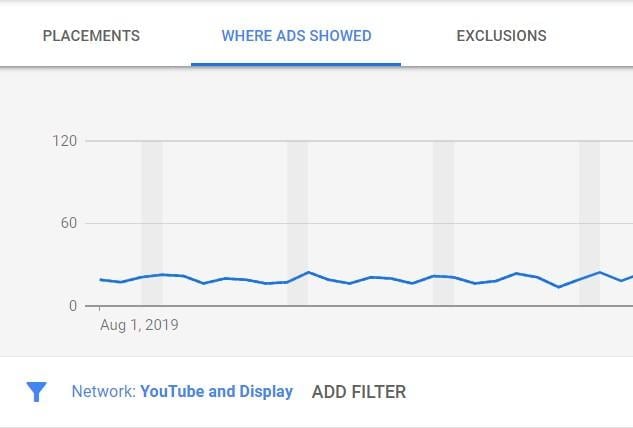
The placements report, as depicted above, reveals where your target audience demonstrates the most engagement or conversions. For this client, we discovered high engagement and conversion rates on websites for recipes, schools, affordable vacations, and other placements associated with users who might have children. These unexpected insights can then be used to create more effective managed placement ad groups. Sometimes, the most effective solutions aren’t always obvious.
5. Match Your CTA With the Best Possible Engagement
In-market and affinity audiences are popular Display Network targeting options. While Google Ads’ Audience Manager helps identify potential options for new display campaigns, I prefer using Google Analytics’ Interests Report.
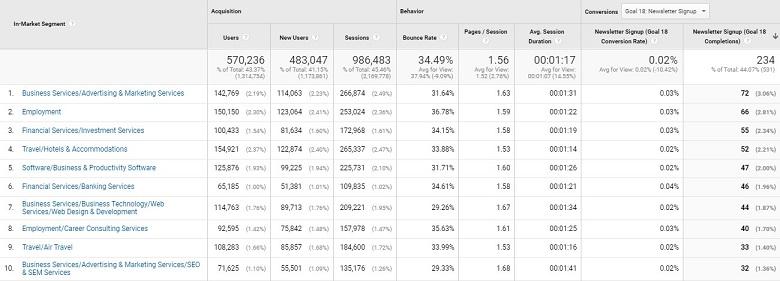
The image above showcases the In-Market Segment report (found under Audiences > Interests in Google Analytics). It displays data for each configured goal conversion in Google Analytics, along with ecommerce transactions and revenue.
Let’s assume we want to target the “Business Services/Advertising & Marketing Services” In-Market audience. By analyzing the report, we can determine which conversion action performs best with current users within that audience. This insight allows us to tailor the CTA on our display ads and landing pages to align with the conversion action that resonates most effectively with that specific audience.
Even if you’re not using In-Market or Affinity audiences, aligning your CTA with the most desirable user action is crucial. Not every user is ready for an immediate purchase or free trial. Experiment with various actions to identify the optimal CTA for each targeting method you employ.
Now, Go Fill the Top of Your Funnel!
Remember, success in PPC advertising doesn’t follow a fixed blueprint. Continuous testing and optimization within Display Network campaigns are vital for improving performance and uncovering new opportunities. While each account is unique, incorporating these “best practices” can lay a strong foundation for successful Display Network campaigns.