In May 2018, Google launched Lighthouse 3.0, a revamped open-source tool designed to assess the quality and speed of web pages. Lighthouse 3.0 introduced new ways to present reports and brought significant changes to how website speed and performance are measured. These included introducing First Contentful Paint as a key metric and implementing new weighting systems for performance audits.

Since May 2018, Google has continued to make changes. That’s why we’re highlighting five optimization strategies for your website. Let’s dive in.
Why prioritize website speed optimization?
Lighthouse has evolved significantly since the release of version 3.0. Recently, Google announced it was working on “Platform Packs” for Lighthouse, allowing testers to get speed optimization advice tailored to the specific CMS and code libraries used on their sites. For example, if your site uses Angular JavaScript with WordPress, this update is beneficial. Thankfully, more Platform Pack variations are already in development, with contributions from the GitHub community.
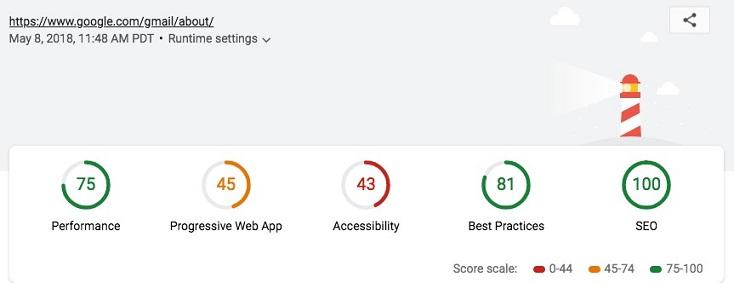
Image source Google has steadily emphasized site speed as a crucial search ranking factor since the mobile-first index was introduced in 2016, making it essential to monitor these metrics and trends. In 2018, Google rolled out approximately 62 algorithm tweak updates every single week on average, emphasizing the increasing need for dynamic SEO practices to maintain good rankings. The mobile-first index’s relative novelty and significant impact on website traffic make it understandable why algorithm updates primarily focus on mobile performance.
Perhaps the most compelling reason to watch Lighthouse closely is that it’s the first time Google has offered a self-service speed measurement tool that replicates real user experiences instead of relying on bots. “Many of the Lighthouse metrics you see are primarily presented from the user’s perspective,” explained John Mueller, Webmaster Trends Analyst, during a an Office Hours Hangout Q&A session in February. “From our standpoint, from a search perspective, we consider various metrics to understand a website’s speed.” With this in mind, we’ve compiled five tips to help your website’s speed meet Google’s standards.
1. Implement lazy loading
High-resolution images can significantly increase your website’s loading time, memory usage, and page weight. While removing them entirely is an option, you might need or prefer to keep them. Lazy loading offers a way to speed up page load times without sacrificing resource-heavy content.
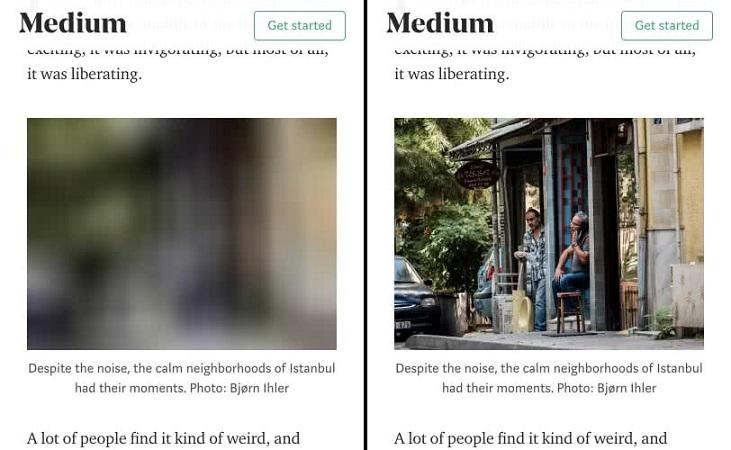
Image Source Lazy loading loads only the visible part of a web page, delaying the loading of the remaining content until the user scrolls down to it. This strategy reduces the time it takes to achieve metrics like First Meaningful Paint and First Content Paint, which Lighthouse uses to measure website speed and performance. Lazy loading is crucial for websites that use “infinite scrolling,” a popular choice for content-heavy sites. However, it can benefit any website. The Duda web design platform found that Duda sites that implemented lazy loading experienced an average 10 points in Lighthouse score lift improvement, a significant boost.
2. Leverage next-generation image formats
Images are often the primary reason for slow First Contentful Paint times. However, in marketing and sales, visuals are incredibly impactful, so you might hesitate to eliminate large, visually appealing hero images. next-gen image formats, combined with lazy loading, offer a solution. Next-gen formats include JPEG 2000, JPEG XR, and WebP. These formats compress and convert images to be much smaller than traditional PNGs and JPGs without compromising image quality. By using next-gen formats, you can drastically reduce page load times, even for images with larger pixel dimensions, without sacrificing quality. Take a look at this data from Insane Lab, which demonstrated the significant size difference between WebP and PNG files:
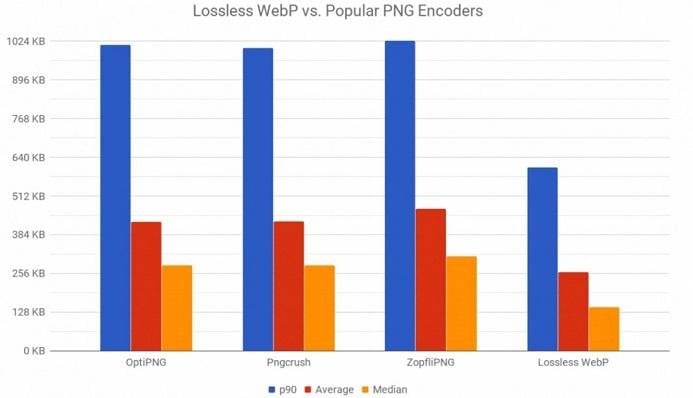
Google particularly encourages webmasters to adopt its new WebP format, which is supported by Chrome and Opera browsers. WebP generates images 26% smaller than PNGs and 25-35% smaller than JPGs.
3. Utilize a content delivery network
A content delivery network, or CDN, effectively speeds up page loads, which are the second most important metric for a good performance rating in Lighthouse 3.0. Essentially, a CDN is a globally distributed network of servers that work together to deliver your website’s content. Due to their geographic dispersion, there’s always a CDN server located close to almost every user, minimizing content delivery time to their browser.
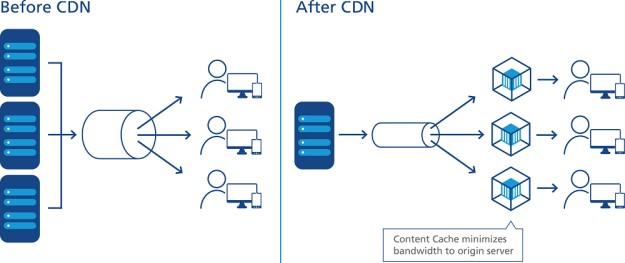
Image source CDNs often employ advanced compression techniques like minification and file compression, enabling faster content asset transfer. They also provide improved content availability and redundancy, ensuring that heavy traffic doesn’t hinder website performance. CDNs are less susceptible to downtime from hardware failures. Prominent content-heavy websites like Netflix, Facebook, and Amazon rely on CDNs for their need for rapid loading times.
4. Eliminate unnecessary plugins
If your site uses WordPress or a similar platform that relies on plugins for additional functionality, these plugins could impact your site’s responsiveness, affect its interactivity metrics, and lower your Lighthouse 3.0 performance scores. While some plugins are essential, like your payment processor, others might no longer be necessary. Many plugins retrieve information from third-party servers, potentially slowing down your site. In a recent survey from DigWP, more than 900 WordPress professionals identified the threshold for “too many” plugins, with 75% agreeing that 25 is the limit. Over a third of respondents recommended a maximum of 10 plugins.
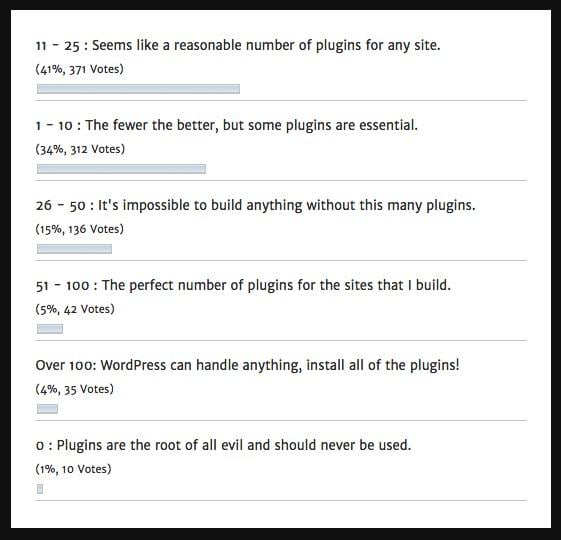
Having too many plugins can overload your database, unnecessarily increasing your site’s weight and slowing down loading times. Therefore, the fewer plugins you have, the better.
5. Remove unused CSS rules
Your website’s CSS rules are defined in the main.css file, also known as the external stylesheet because it’s stored separately from the site’s HTML. For your site to load First Contentful Paint, which significantly impacts performance in the new Lighthouse version, the browser must first retrieve, parse, and process every CSS stylesheet to determine how the content should be displayed.
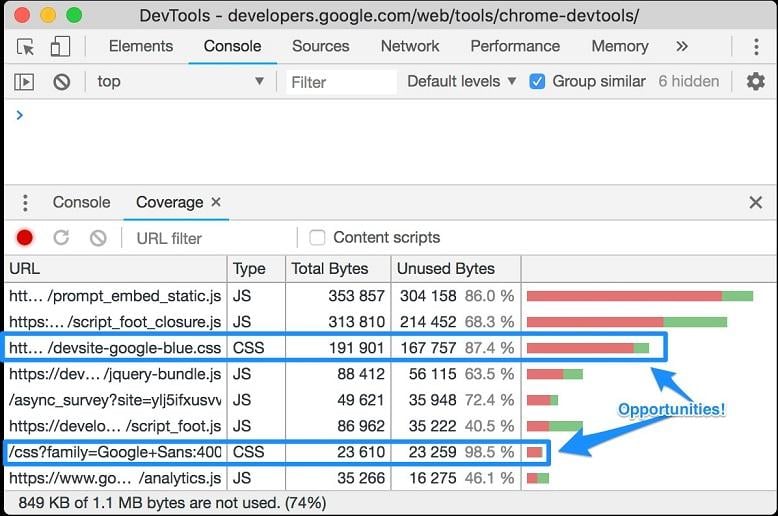
Image source While minifying your CSS files using a plugin like Fast Velocity Minify can significantly improve your Lighthouse scores, there’s more you can do to optimize CSS load times. Removing all unused CSS definitions further speeds up your site and streamlines its performance, leading to better Google rankings.
Performance improves by adhering to Google’s speed guidelines
The introduction and ongoing development of Lighthouse 3.0 underscore the significance of optimizing your site based on Google’s latest speed criteria. You can streamline your site, reduce page load time, and enhance performance to remain in Google’s good graces by eliminating unnecessary CSS rules and plugins, using CDNs and next-gen image formats, and implementing lazy loading.