If you haven’t joined TikTok during quarantine, more power to you. I wasn’t convinced at first, but let me tell you: this platform is seriously addictive, and in a good way! Not only does it cater to every interest imaginable (dance, activism, beauty, even beans!), but you’re bound to pick up new skills and discover catchy tunes along the way. Speaking of tunes, the music selection is amazing! It’s basically free entertainment for as long as you can swipe—or at least until TikTok hits you with a “take a break” message like Netflix does. Guilty as charged!

My point is this: If you’re not on TikTok, you’re missing out. And your business is, too. This platform is quickly becoming the go-to for young people, surpassing even Instagram. If that’s where your target audience is, you need to speak their language. In this guide, I’ll walk you through five easy steps to launch your first TikTok ad campaign. Plus, I’ll show you how to track your results. But first, let’s explore why advertising on TikTok is a smart move.
Why choose TikTok for your ads?
TikTok is the fastest growing social media platform on the planet, with over 2 billion downloads and counting. Especially now, during a global pandemic, TikTok provides a much-needed dose of fresh air for people seeking fun and creative ways to connect with each other through video.
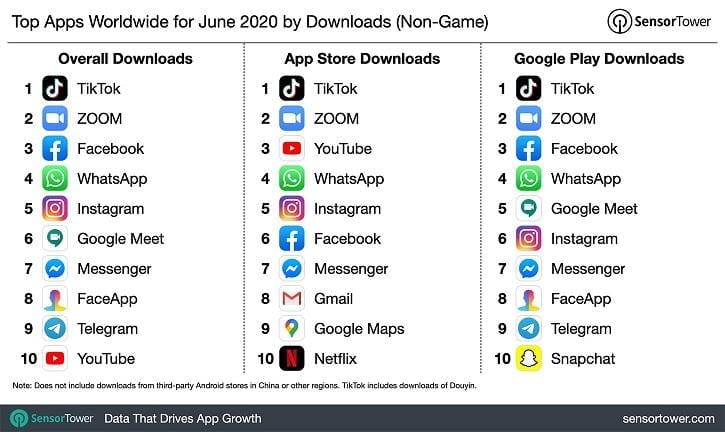
Just last month alone, TikTok was downloaded 87 million times. Although TikTok is secretive about its user data, reports indicate that their audience is expanding beyond Gen Z to include more Millennials. However, 67% of users are under the age of 29. They boast a whopping 800 million MAU (monthly active users), with 65 million located right here in the US. What’s more, the costs are manageable. TikTok ads are competitively priced, with cost-per-click averaging around $1.00, similar to Facebook ads.
5 Simple Steps to Set Up Your TikTok Ads
TikTok’s advertising platform is organized into three levels: campaigns, ad groups, and ads. In this section, we’ll break down the process of creating each level, step-by-step, so you can launch your TikTok ad campaign with confidence.
Step #1: Setting Up Your Business Account
If you have a personal TikTok account, you’ll still need to create a separate account specifically for your business. Using your business email for this account is recommended. It used to be that businesses needed approval to advertise on the platform, but thankfully, anyone can jump in and start running campaigns now.
Step #2: Creating Your Ad Campaign
Once logged in, TikTok whisks you away to the campaign creation page. No time wasted! If you prefer to get the lay of the land first, you can easily navigate back to this section through the “Campaign” tab. The platform is very user-friendly (almost minimalist), so finding your way around is a breeze. Don’t forget to give your campaign a memorable name and set your budget in the settings! A handy feature on TikTok: You can effortlessly set up A/B tests (creative split tests) at the campaign level. After naming your campaign and setting a budget, it’s decision time. You’ll need to select an advertising objective for your campaign. Like most ad platforms, TikTok provides straightforward options. Let’s take a look. RELATED: The Ultimate Guide to Finding the Best Time to Post on TikTok
Choosing Your Advertising Objectives
Your first option, and the one that sits at the top of the marketing funnel, is awareness. This is where you’d launch a reach campaign. Reach campaigns are all about building brand awareness. They don’t include a call to action and simply aim to get your ad in front of as many users as possible.
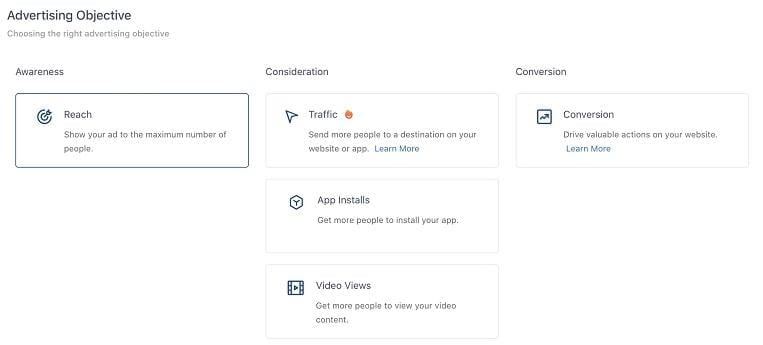
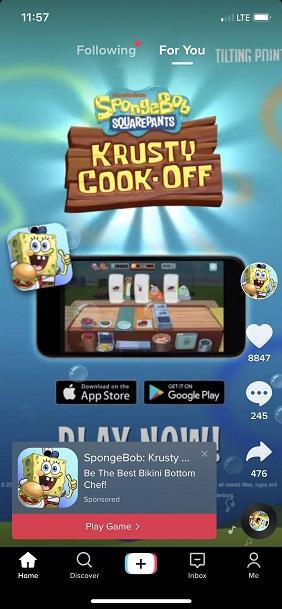
Moving a little further down the funnel, consideration objectives are pretty self-explanatory. The goal here is to use your TikTok ad budget to drive traffic to your website, boost downloads of your mobile app, or increase views on your TikTok videos. This type of ad might resemble the one shown below.

Last but definitely not least is conversion. Think of this as the choose-your-own-adventure objective. You get to pick your desired outcome, whether it’s email newsletter sign-ups, account registrations, or driving purchases on your ecommerce website.
Step #3: Defining Your Ad Group
This is where things get down to the nitty-gritty. You’ll choose your ad placements, fine-tune the details, manage your budget and billing, and even set up third-party tracking. Ad specifics will vary depending on your chosen campaign objective but should be fairly straightforward. For instance, if your objective is “traffic,” you’ll specify whether you’re directing users to your website or an app and the exact landing page you want them to reach. Quick reminder: If you’re aiming for deeper-funnel actions, you’ll need to install the TikTok pixel on your website to track those conversions effectively. This is similar to placing pixels for Facebook or Twitter—you can easily add it through Google Tag Manager.
Choosing Your Placement
TikTok offers several placement options for your ads, but only for specific campaign objectives. Like Facebook, TikTok has a “family of apps”—including BuzzVideo, Pangle, and News Republic—that you can leverage for advertising. However, these are primarily beneficial if you’re targeting audiences outside of the United States. You can allow TikTok’s algorithm to automatically place your ads across these apps, or you can handpick where you want them to appear. Get more details from TikTok here.
Targeting Your Audience
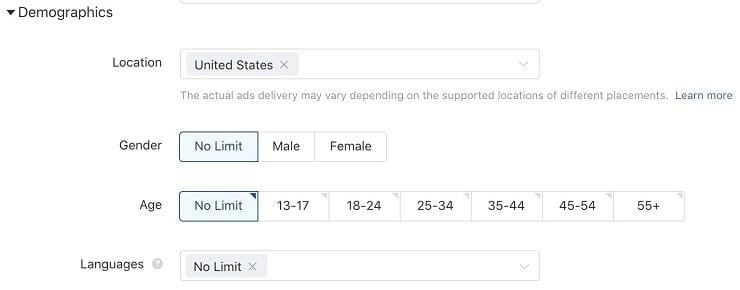
There’s been some grumbling about TikTok’s audience targeting, or the lack thereof, and I can’t say I completely disagree. Like the ad manager itself, the targeting options are fairly basic. Demographics are limited to gender, age, location, and language.
The most detailed targeting you’ll find is under “interests.” This category includes a range of topics that people follow on TikTok, from apparel and appliances (who knew?) all the way to technology and travel. These interest categories are fairly broad, so to maximize your return on investment, you’ll get the most mileage out of creating custom or lookalike audiences based on your existing customer database.
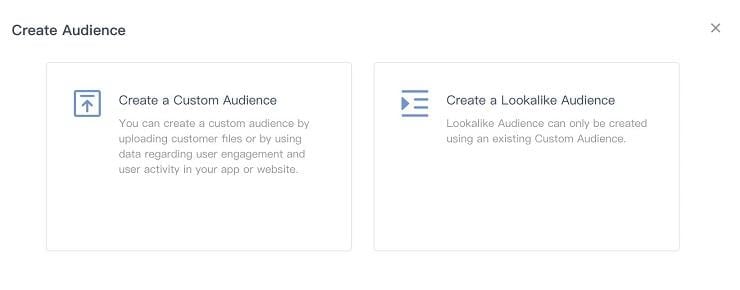
Lastly, you have the option to target by device type and connection type. This one’s pretty unique—I’ve never encountered targeting based on 2G connections before!
Managing Your Budget and Bidding
Input your desired daily budget, and if you opted for a split test earlier, set the dates for your test. Next, choose your bid per click, conversion, or view (this will align with the goal you set for your campaign). You’ll also select your delivery type and include any third-party tracking links for your analytics. Here is a full list of third-party measurement platforms supported by TikTok. Remember, your daily budget must be a minimum of $20. You can also enable dayparting and frequency capping here if you’re aware of the times when your target audience is most active on TikTok. RELATED: Mastering the Art of TikTok Stitching (With Hilarious Examples to Inspire You)
Step #4: Bringing Your TikTok Ads to Life
Don’t worry if your business lacks an in-house creative team, agency, or dedicated videographer. TikTok marketing is a haven for user-generated content, and the platform makes ad creation a breeze. Take a look at the screenshot below for ad specifications. The best (and I mean BEST) part of crafting TikTok ads is that the platform assists you in creating a video with a perfectly synced background track using your uploaded images. I wouldn’t typically recommend making videos from stock images, but TikTok videos are meant to be short, sweet, and casual. Often, a less-polished look can actually be more engaging.
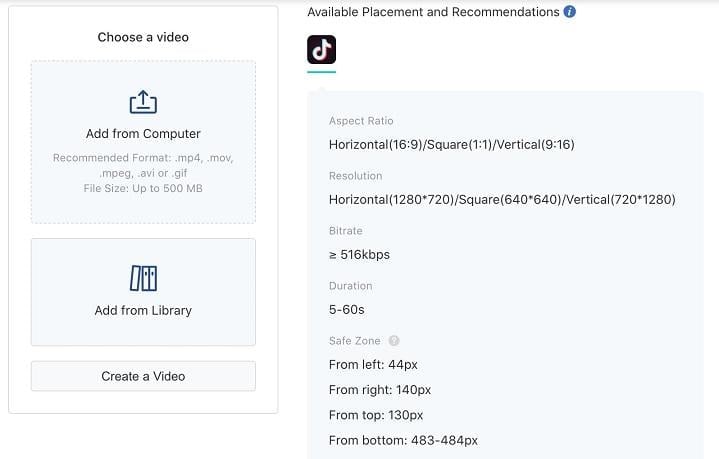
When you select “Create a Video” and then “Video Generator,” you’ll notice an option for “Smart Video.” According to TikTok, the smart video generator analyzes your uploaded images and the music you’ve selected to seamlessly cut your video with transitions. They suggest uploading a variety of images or videos for optimal results. Check out the interface and its various options below.
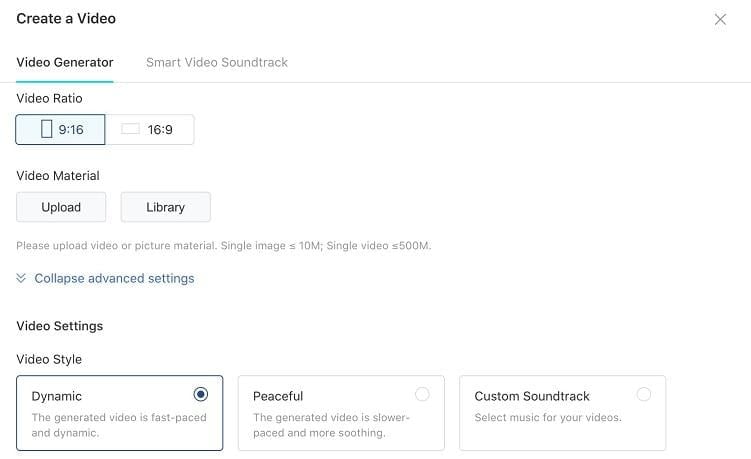
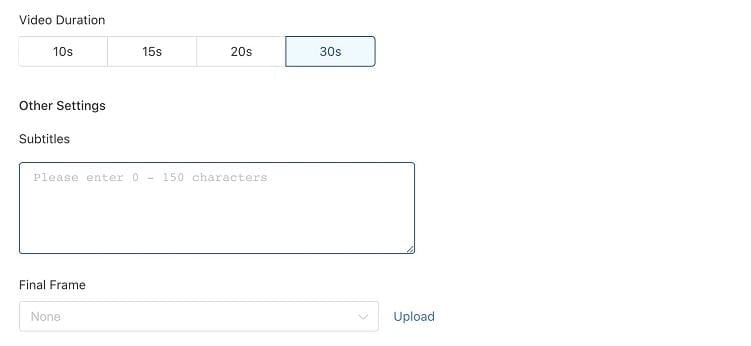
TikTok ads appear in users’ For You feeds just like regular videos. When your ad ends, it freezes on the last frame and displays a call to action, which is why the platform asks you to specify a final frame. You can also use imagery directly from your website’s landing page to create video ads. This feature is especially useful for ecommerce sites with product pages or mobile apps. TikTok will grab images from your landing page, match them with suitable music, and transform them into eye-catching ads.
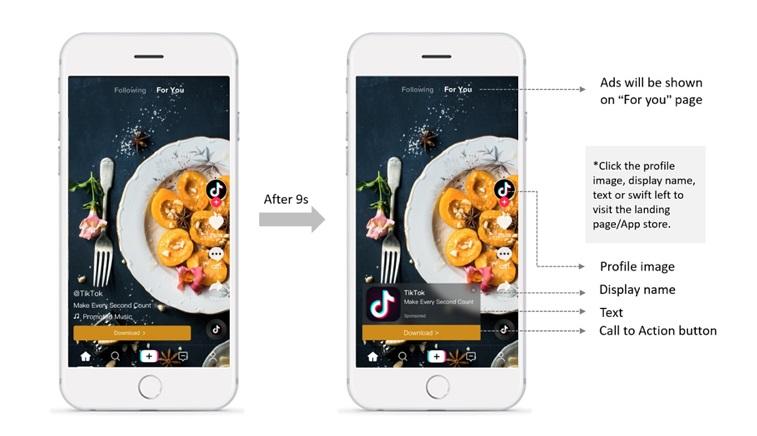
As always, the key is to test, test, test. Experiment with different visuals and music while keeping your message consistent. Focus on conveying one clear message and test various calls to action. Showcase people using your product. Don’t forget to leverage TikTok hashtags, as users rely heavily on them to search for content. For inspiration, explore the TikTok ads library to see what other businesses are doing!
Step #5: Setting Up Your Billing and Payment
You’re almost there! Simply enter your billing details and payment information, and you’ll be ready to set your TikTok ads free!
Tracking the Performance of Your TikTok Ads
TikTok offers a handy dashboard that displays all the data from your ads within your chosen timeframe. You can filter the dashboard by goal (e.g., CPM or CPC) and any other settings you selected while creating your ad group. And here’s the best part: TikTok allows you to export your reports! This is a lifesaver when you need to demonstrate to your CMO how effectively those TikTok ads are resonating with users interested in cars, sports, or any other niche. You can also streamline your weekly reporting by setting up create custom reports. You have the option to build these reports from scratch or use TikTok’s pre-designed templates. Here’s a sneak peek at the metrics and dimensions you can include.
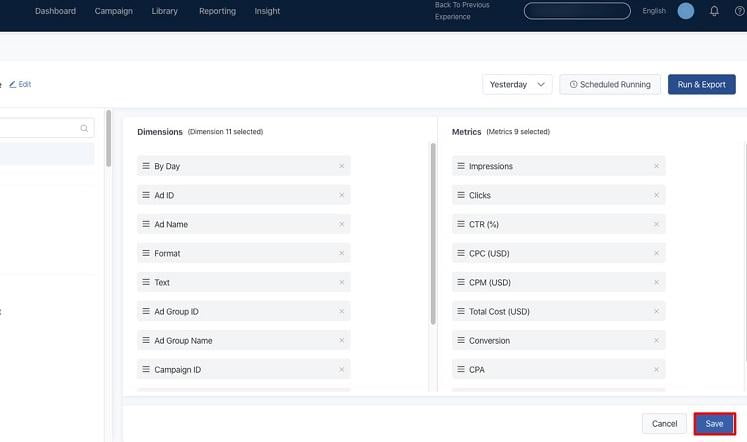
Schedule these reports to be delivered daily, weekly, or on specific days of the month, and voila! Your team will receive regular email updates with the latest performance data. Just keep in mind that anyone receiving these reports needs access to your TikTok Ads Manager. Remember, if managing ads directly isn’t your cup of tea, influencer marketing is huge on TikTok. The platform has even been paying influencers to join, so consider exploring this avenue based on your budget. Micro-influencers, in particular, can make a significant impact, especially in local markets. TikTok even has its own dedicated platform for partnering with these influencers to simplify the process of finding the perfect influencer match.
Go Forth and Conquer TikTok Advertising!
Drumroll, please… you’re officially ready to dive into the world of TikTok advertising! We wish you the best of luck. And if you launch a particularly successful campaign, we want to hear all about it! Hungry for more tips? Check out this post on how to get more likes on TikTok.