It’s understandable why explaining the value of YouTube to a client can be a challenge. Running video campaigns through Google Ads adds to this complexity because it can create a mistaken belief that these campaigns should mirror the performance of Search campaigns, which is usually not the case.
I’ve found video campaigns on Google Ads to be a highly effective way to raise awareness for my clients’ businesses, which can ultimately influence a potential customer’s decision to make a purchase down the line. Because viewers of these video ads might not be immediately prepared to convert, we cannot look at only conversions as a success metric. Instead, I focus on other key performance indicators (KPIs) to determine whether my ads are successfully encouraging users to take the desired actions.
Let’s explore four of my favorite, often overlooked, metrics that can help gauge the true effectiveness of a YouTube ad campaign.
1. The “Video played to” column
It’s no secret that people primarily use YouTube to watch videos. Even when the objective is to drive traffic to a landing page, the initial step in a successful video campaign involves capturing the viewer’s attention with the video ad itself. Understanding how long users engage with the ad can provide valuable insights into their level of attention to your message.
You can easily add the “Video played to” metrics from the Performance columns menu.
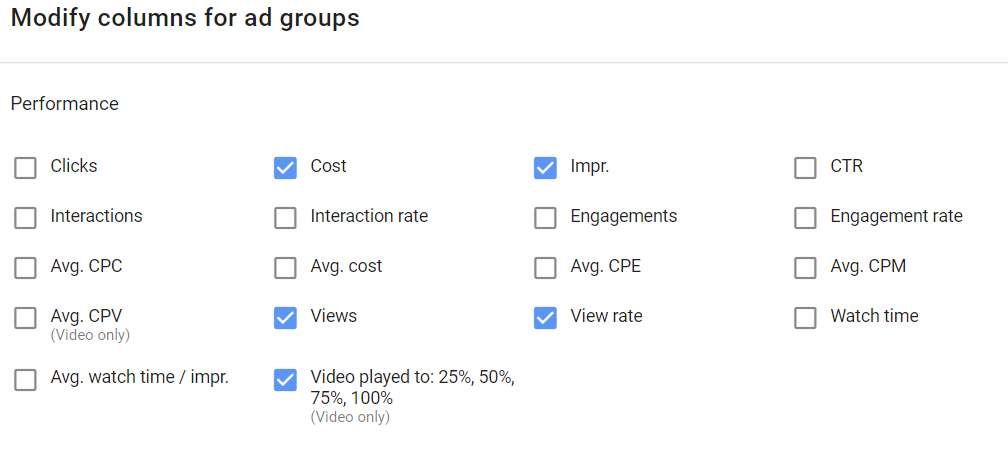
This column tracks whether a user has reached four key milestones: 25%, 50%, 75%, or 100% of the video’s duration. Note that if a user watches 45% of the video, it will only register as reaching the 25% milestone—there’s no rounding up here.
For skippable TrueView in-stream ads, I advise placing your most crucial message (e.g., call to action, value proposition) early in the video. This way, even if a user skips the ad, you likely won’t be charged and still manage to convey your message. However, we sometimes have to work with less-than-ideal video creatives. This is where analyzing the “Video played to” metrics proves beneficial.
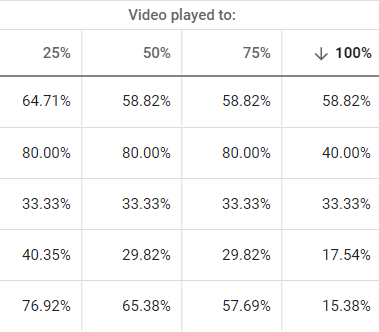
Let’s say your video ad’s value proposition appears around the 30% mark. If a significant portion of users aren’t even reaching the 25% mark, it suggests that your ad isn’t engaging enough to hold their attention until the 30% point.
For TrueView discovery campaigns that utilize longer video content, this column helps assess how effectively you’re engaging viewers, particularly since you’re paying for every single view. Your primary objective might be driving traffic, especially if you’re focused on call-to-action extension testing, and this will influence how long users watch your video ad. Remember to consider all factors that might lead a user to stop watching your videos prematurely.
2. Earned actions
In TrueView discovery campaigns, advertisers are charged each time a user clicks on their ad. For skippable TrueView in-stream campaigns, advertisers typically pay for video views (at least 30 seconds or the full video if it’s shorter than 30 seconds). However, if a user interacts with a call-to-action extension, companion banner, or Shopping card first, they’ll only incur a single charge. Any subsequent action they take after this initial paid view is considered a free “YouTube Earned Action,” and these actions have dedicated columns within Google Ads.

Any views, shares, likes, subscriptions, and playlist additions a viewer makes after you’ve paid for their initial interaction with the ad are free. What’s even better is that we can track all these post-view actions directly within Google Ads. My clients appreciate knowing how we’re maximizing their budget. So, even if some targeting efforts aren’t generating direct conversions, I still want to see if users are engaging with my client’s brand after watching the video ad.
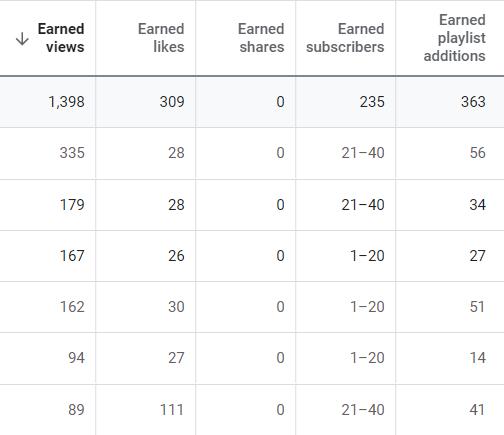
By accumulating enough of these Earned Action metrics (along with any organic performance you might have), you can create audiences based on these actions within Google Ads Audience Manager. That’s right—you can build audiences from channel views, likes, shares, playlist additions, and subscribers! These audiences can then be used for further remarketing on Google Search, YouTube, and Gmail campaigns. Any conversions generated from these YouTube user audiences can be attributed to your initial video marketing endeavors, providing further evidence of video’s value.
3. View-through and cross-device conversions
View-through conversions track conversions that happen after a user sees your ad (impression) without interacting with it and subsequently converts on your website. It’s important to note that an impression is not equivalent to a view. We discussed how video views are counted for in-stream ads in the Earned Action section—those view conversions (from actually watching the video or clicking on an element within the ad) are reflected in the “Conversions” column.
Cross-device conversions, on the other hand, are registered when a viewer clicks on your ad on one device and later completes a conversion on a different device. This metric has become increasingly important for my clients running video campaigns in recent years because we’re seeing a growing number of video views originating from mobile devices. This allows us to leverage video ads with call-to-action extensions to attract users to our client’s website. If the site performs better in terms of conversions on desktop, we often see those conversions occurring later on a desktop device, demonstrating that the initial mobile video view was still valuable.
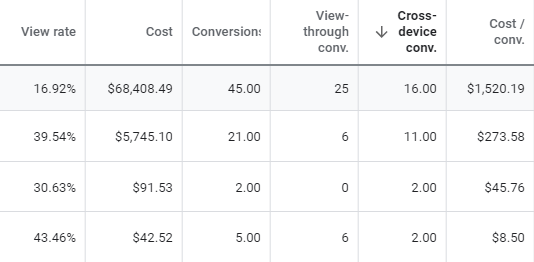
Both columns can help determine whether your video campaigns are successfully influencing conversions down the line. However, exercise caution when reporting cross-device conversions. Based on the conversion columns you’re primarily using for reporting, cross-device conversions are factored into the “All conversions” column.
4. Audience performance
Remember those Earned Action audiences I mentioned earlier? Well, those aren’t the only audiences you can create from YouTube users in Google Ads. Here’s a complete list of audiences you can generate from YouTube users within Google Ads’ Audience Manager.
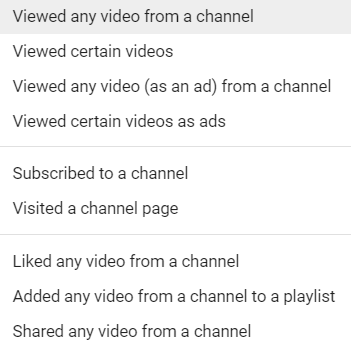
The first thing I do in any Google Ads account I manage that’s running video campaigns is create a basic audience comprising anyone who has viewed any video from my client’s channel. I then maximize the audience duration to the full 540 days. This creates the broadest possible YouTube user audience and is ideal for smaller accounts with limited video views. Next, I create as many of the other YouTube user audiences listed above as I deem appropriate, provided they’ll yield a substantial amount of traffic.
Once I have these audiences, I add them to my Search Network campaigns as “Observation” audiences. This targeting setting essentially functions as a “bid only” audience. Initially, my objective is not to target the YouTube user audiences separately on search (though it’s definitely an option). Instead, I want to gather as much data as possible on these audiences.
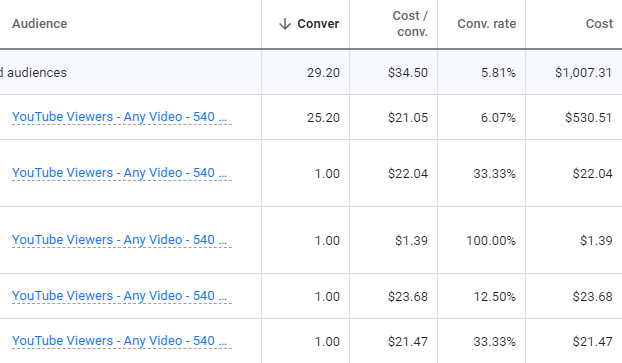
After the video campaigns have been active for a while, I can then analyze the data and see if I can glean any insights into how my YouTube marketing efforts (including organic YouTube activity) are influencing my Search Network campaigns. I can determine whether users within these YouTube user audiences exhibit higher click-through rates, conversion rates, or any other metric relevant to my client’s goals.
Technically, these are remarketing lists for search ads (RLSAs). For any audience to start generating data in your Search Network campaigns, it needs to have at least 1,000 active users within the past 30 days. That’s why I recommend starting with a single audience encompassing any video view in the past 540 days. As your other YouTube user Observation audiences reach the 1,000-user threshold, you can progressively add them to your Search campaigns.
A final point to keep in mind is that this audience data review only reveals how many users return to interact with your paid keywords in Google Ads. The Audiences report in Google Ads won’t show if they visited your website directly, eventually landed on your site via Bing, or even found you through Google organic search. So, while YouTube user audiences don’t provide the complete picture, any data is better than none.
Looking beyond conversions as the sole success metric
While conversions are undeniably important and should always be a key consideration, it’s crucial to remember that users aren’t always ready to convert the first time they encounter an ad, especially on YouTube. People primarily go to YouTube to enjoy music, watch entertaining videos, follow their favorite gamers, and engage in similar activities—not necessarily to download your whitepaper or purchase your products. However, YouTube can be incredibly effective in raising awareness among the right audience.
When your creative resonates with your target market, you can influence users to eventually seek out your brand or products, potentially leading to a conversion further down the line. Leverage the measurement tools available within Google Ads to understand how effectively your video campaigns are influencing future conversions. Google Ads provides a wealth of information that can help you gauge the true success of your campaigns beyond just direct conversions. Utilize it to your advantage.
And don’t forget to explore the four YouTube Studio reports that you won’t find in Google Ads!