Google just rolled out a bunch of new Google Ads (previously Google AdWords) features designed to boost your paid search campaign performance across the board. This article breaks down everything you need to know to implement these game-changing updates in your account.
#1: Promotion Extensions
Since Google Ads’ inception, advertisers have been stuck using headlines and descriptions to share promotions. Not anymore! We discussed Google Ads promotion extensions back in May during their beta phase, but they’re now available to everyone.
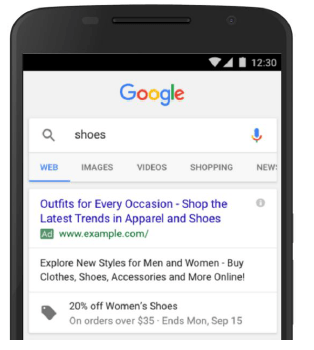
Promotion extensions let you add—wait for it—promotions to your text ads. Whether it’s a discount code or a site-wide sale, these extensions will send your CTRs through the roof. Imagine selling Vermont’s finest granola: hand-rolled oats, dried quinces, luxurious cacao nibs, and love in every bite. Instead of creating separate Black Friday ads, apply an account-level promotion extension like this:
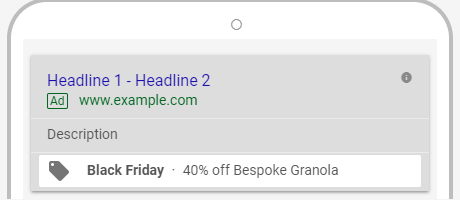
This not only makes your ads larger on the search results page, but the price tag icon and bold text make your sale stand out. But there’s more to promotion extensions than meets the eye. They keep your sales and promotions current without needing to change your ad copy. Use headlines and descriptions for relevance, and don’t pull high-performing ads (no need to start from scratch with CTR). This means bigger holiday sales without sacrificing Quality Scores or inflating CPCs. Promotion extensions also let you keep your headline CTA. Instead of replacing “Buy now” with “40% off this weekend,” you have room for both.
#2: Ad Variations
Speaking of tweaking ad copy, Google now lets you test ad variations on a large scale. And I mean large. Any good PPC expert constantly A/B tests. Sadly, this has been tedious, requiring multiple ad uploads with slight changes (headline, CTA, holiday themes) rotated against a control. Ad variations simplify split testing. If you’re using the new Google Ads experience (soon to be the only experience), you’ll see the new ad variations tab. This allows for large-scale testing and changes, quickly.
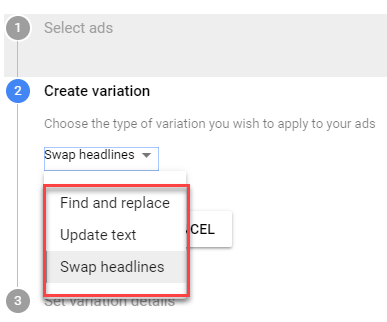
The ad variations interface lets you:
- Find and replace specific words (or keywords) in your ads
- Update entire text components (headlines, descriptions, paths)
- Swap your headlines I love that last one for testing which headline drives relevance (containing your target keyword) and which one encourages clicks. Don’t forget to check the Experiment split section at the bottom of step three (where you set start and end dates) when using ad variations.
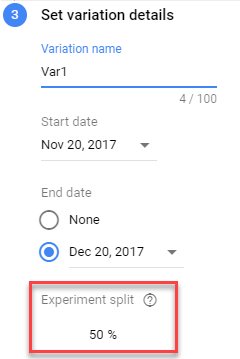
Experiment split refers to how much of your campaign budget is “allocated to your variation and what percentage of auctions it can enter.” To experiment with a small portion of your budget (smart during peak eCommerce seasons), adjust your split accordingly.
#3: Custom Intent Audiences
The Display Network can be unpredictable. Without careful placement control, your amazing banner ads get lost in a sea of irrelevant websites designed for pennies per click. Remarketing is different because your audience’s intent and history matter more than being surrounded by clickbait and gossip.
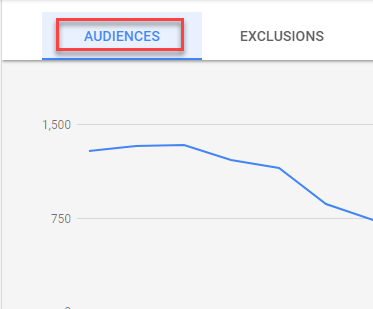
Imagine reaching Display Network users actively searching for your unique product or service… Now you can! According to Google, custom intent audiences leverage “Google’s machine learning to analyze your existing campaigns and auto-generate audiences… based on common keywords and URLs people browse while researching products or services.” These audiences are then added to your Display Network options. We’ve seen these auto-generated custom intent audiences in our account:
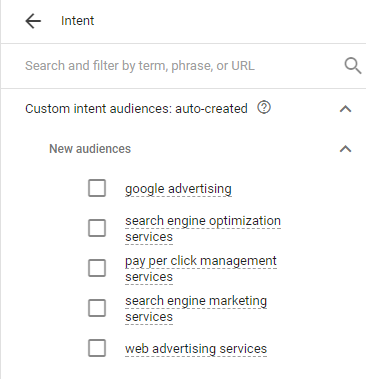
Essentially, Google analyzes your Google Ads, website, and YouTube data to understand your offerings, then compares that to user behavior to create new, qualified (at least for Display) audiences. This audience creation strategy signifies Google’s shift towards Facebook-like, audience-centric Display Network targeting, where characteristics outweigh intent for reaching new prospects. Besides these AI-powered options, you can create custom intent audiences using your own URL and keyword combinations.
#4: Gmail Remarketing
Finally, Gmail Remarketing. I was devastated when Google removed domain targeting from Gmail ads (the best way to target competitors, in my opinion). But the ability to remarket—especially dynamically—through Gmail is a game-changer. Google calls it “an immersive shopping experience” in your prospects’ inboxes. I call it a Black Friday miracle. For eCommerce advertisers gearing up for the busiest shopping season, bringing a prospect’s abandoned cart directly to their inbox is a dream come true.