It’s common knowledge that Google Ad Grants for Nonprofits come with certain restrictions. Although it’s tempting to dwell on the limited features, it’s more productive to adapt and work around them. By employing smart strategies, we can maximize the potential of these campaigns.
Let’s explore three key workarounds to unlock a wealth of free traffic:
- Utilize mobile app extensions.
- Leverage Dynamic Search Ads.
- Implement automated bidding to overcome CPC limitations.
1. Promote your apps creatively with mobile app extensions
The first workaround revolves around mobile app extensions, offering a clever solution for promoting your nonprofit’s app. By default, Google Ad Grants restrict advertisers to text-based campaigns on the search network. This limitation prevents nonprofits from running universal app campaigns. Even if you attempt to create one in Google Ads Editor, it will be flagged as invalid.
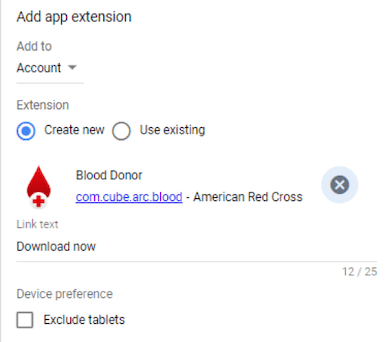
However, there’s a bright side: while dedicated universal app campaigns are prohibited, app extensions within search ads are permissible. This is because app extensions are simply components of your search ads, which are allowed on the search network.
Similar to other extensions in Google Ad Grants, app extensions can be added at the account, campaign, or ad group level. If your app is available on both Android and iOS, you’ll need to set up two separate extensions. This is particularly beneficial if your app aligns with your Google Ad Grants goals, as app installs can be tracked as conversions within your account. You can find detailed information about the types of app conversions you can track on the Google Ads help website.
2. Expand your reach with Dynamic Search Ads
Our second workaround focuses on Dynamic Search Ads (DSAs). As we’ve established, Google Ad Grants accounts primarily permit search network campaigns. Fortunately, DSAs fall under this category. To enable this feature, navigate to your campaign settings, click on “Show more settings” under the “Networks” section, and you’ll find the option for Dynamic Search Ads.
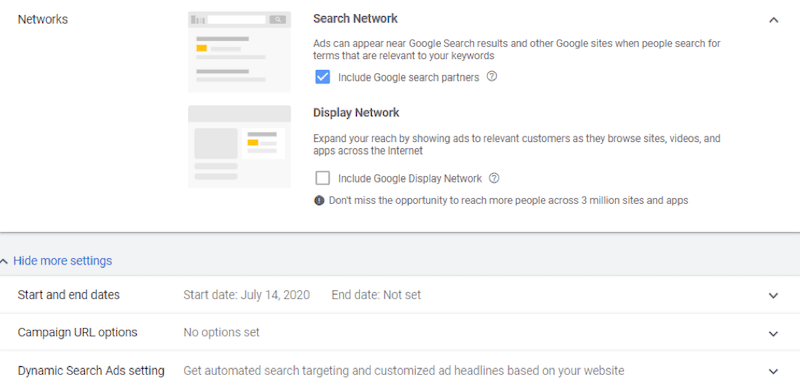
For those unfamiliar with DSAs, they offer a powerful way to broaden your search network reach. Instead of relying on keywords, DSAs allow Google to target users based on the content of your website. This can be particularly useful if your Google Ad Grants account is underutilizing the allocated budget, if your desired keywords are highly competitive, or if you’re struggling to identify new keywords. Consider experimenting with DSAs to maximize your nonprofit’s visibility.
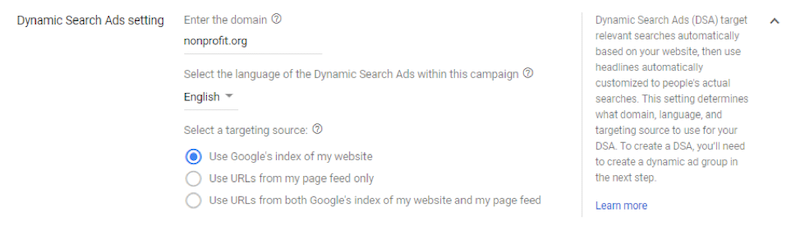
As illustrated above, you have the flexibility to target your entire website, specific URLs from a page feed, or a combination of both. To create a page feed, navigate to the Business data section within the Setup column under Tools & Settings in Google Ads. The remaining campaign setup process closely resembles that of standard Search Network campaigns.
DSAs have proven effective for numerous Google Ad Grants accounts, particularly those with limited reach or operating in niche industries with low search volume. By utilizing all website pages, we aim to maximize reach and drive traffic to the client’s website, fully capitalizing on Google’s free ad spend for enhanced brand awareness. Conversely, for larger accounts with substantial traffic and near-maximum grant utilization, you can refine your targeting by selecting specific URLs for DSAs. This allows you to focus on collective themes within your website without creating dedicated page feeds.
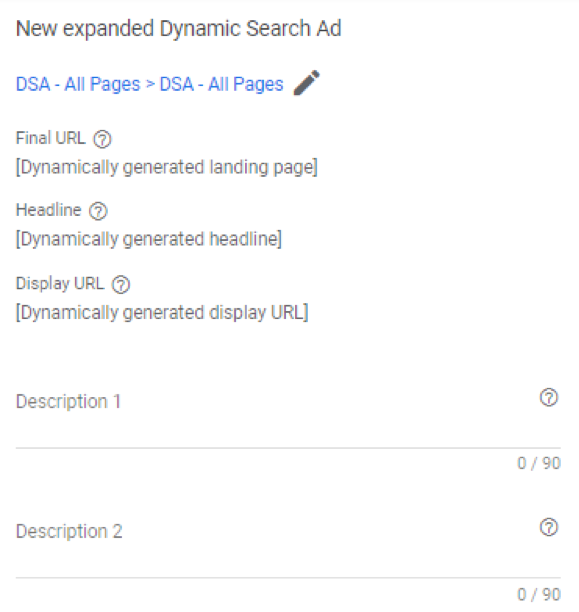
However, it’s important to note that with DSAs, Google retains control over the landing page and ad elements such as headlines and display URLs, based on your settings. You can only customize the two description lines. If brand perception, headline control, or cautious messaging are paramount, DSAs might not be the ideal fit.
Despite this, DSAs can significantly expand your search network reach and unearth valuable keywords for future campaigns. Although DSAs don’t directly target keywords, you can still analyze search terms in your reports to identify converting terms from your DSA campaigns. Subsequently, you can incorporate these terms as new target keywords in your account. To avoid overlap, it’s recommended to create negative keyword lists for all non-DSA campaigns, preventing the DSA campaign from competing with your other search campaigns within the Google Ad Grants account. Apply this list to all your DSA campaigns and regularly update it with new keywords added to those campaigns. This ensures a clean and organized account structure while minimizing overlap. Let’s now delve into our final workaround.
3. Bypass CPC limitations with automated bidding
The last workaround, and my personal favorite, involves leveraging automated bidding to navigate the CPC limitations imposed on Google Ad Grants accounts. Manual bidding in Google Ad Grants accounts is capped at a maximum CPC of $2.00. Any attempts to exceed this limit will be rejected.
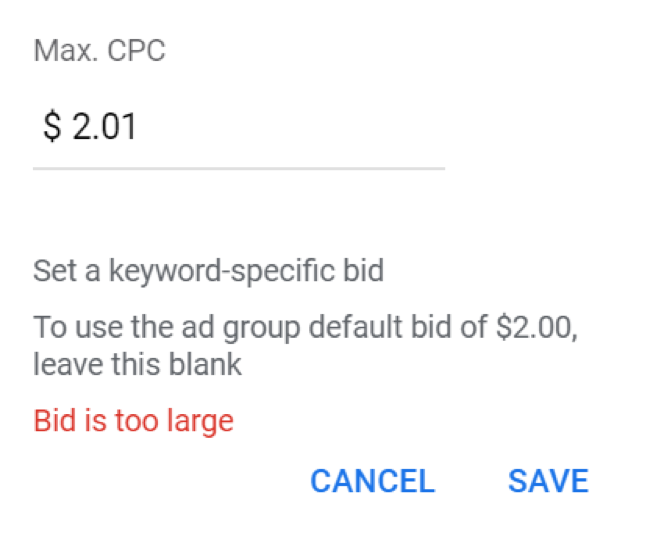
While this might seem restrictive, automated bidding offers a solution. Within your campaign settings, navigate to the Bidding section. By clicking on the dropdown menu, you’ll discover a range of alternative bidding options.
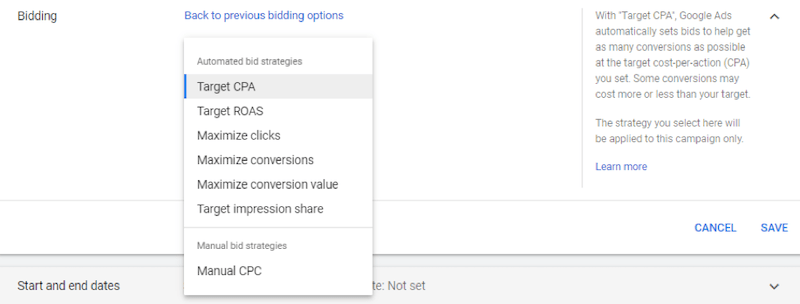
If your primary focus is maximizing traffic within the constraints of your Google Ad Grants budget, “Maximize clicks” presents a viable option. Conversely, if your account is well-established with a history of conversion data, consider “Maximize conversions” or “Target CPA.” Automated bidding has proven successful across numerous Google Ad Grants accounts under our management. Depending on the campaign and competition, we’ve observed actual CPCs reaching up to five times the $2.00 manual CPC limit.
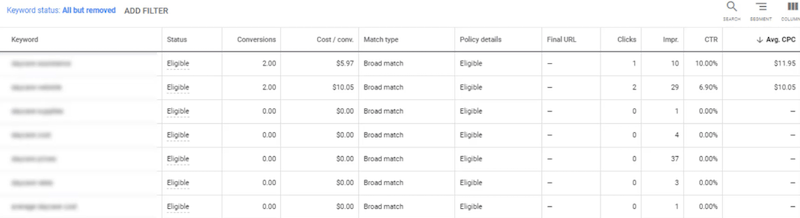
In the example ad group shown above, we switched to “Target CPA” bidding. Initially, our bids consistently fell below the first page bid for all keywords within this ad group, resulting in limited traffic. The switch to automated bidding was a strategic decision to address this issue. As a result, the account began receiving unprecedented impressions, and the average CPCs for some keywords reached almost $12.00 – significantly surpassing the $2.00 manual bidding threshold. This clearly demonstrates the power of automated bidding in unlocking visibility for keywords that would otherwise be unattainable. Furthermore, these keywords have started generating conversions as an added benefit.
Maximize your Google Ads Grant for Nonprofits!
Given the opportunity to leverage $10,000 or more in free ad spend, it’s imperative to maximize this resource for the growth and online reach of your nonprofit. Hopefully, this post has provided valuable insights and actionable recommendations to overcome the limitations of Google Ad Grants accounts. Implement these strategies and witness firsthand the positive impact on your traffic and conversions. If you have any additional workarounds not covered here, we encourage you to share them in the comments below. Let’s work together to empower nonprofits in the digital landscape.