Autocomplete: Your Helpful (and Sometimes Hilarious) Search Sidekick
Search suggestions can be compared to that friend who always tries to finish your sentences – sometimes helpful, sometimes annoying. We’ve all thought, “No, Google, that’s completely wrong!” However, just like that friend, we’d probably miss those suggestions if they were gone.
Google’s Autocomplete function saves time by offering search suggestions as you type, especially for common phrases. For instance, when you begin typing “Fa…”, it predicts you’re looking for Facebook. While some suggestions seem oddly specific and humorous, Google assures us they are algorithmically generated:
As you type, Google’s algorithm analyzes previous user searches to anticipate and display likely queries. If you’re logged into your Google Account and have enabled Web History, the suggestions may also include relevant past searches… With the exception of potential Google+ profile appearances, all suggestions in the dropdown list come from previous user searches.
These predicted queries are based solely on algorithmic factors like search term popularity, with no human intervention. The autocomplete data updates regularly to include new and trending searches.
Throughout your Google search history, those suggestions likely save you a significant amount of time. But their usefulness goes beyond saving you a few keystrokes. Here are three additional ways to leverage them.
Uncover Keyword Opportunities with Search Suggestions
Since suggestions are algorithmically generated based on search volume and popularity, they offer a simple way to conduct preliminary keyword research. For example, imagine you’re writing about those unique running shoes resembling gloves for your feet, often called “glove shoes” or “barefoot running shoes.” These terms likely face high competition. Explore Google’s search suggestions for more niche topics:
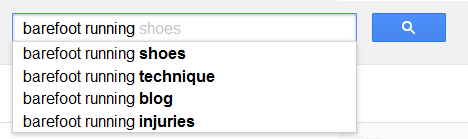
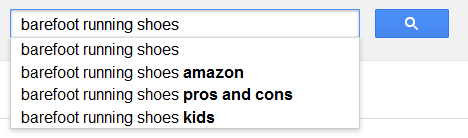
Modifiers like “technique”, “injuries”, and “pros and cons” highlight that barefoot running and glove shoes have both advantages and disadvantages, potentially posing risks if used incorrectly. This signifies a demand for this information. You can then refine your search using Autocomplete to discover related phrases within the same keyword category:
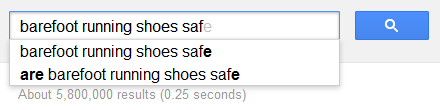
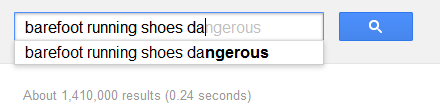
Consider cross-referencing these phrases with a dedicated keyword tool to confirm reasonable search volume and competition, helping you determine the optimal primary target.
Reputation Management: Stay Ahead of the Search Game
Google’s search suggestions can also alert you to potential reputation management issues. In fact, Autocomplete made headlines recently for this very reason – Barry Schwartz reported that Google has been ordered to shut the feature down in Japan, “after being sued by a man for the auto-complete suggestions.”
Last year, I wrote about the wave of negative, 1-star reviews flooding Amazon for a product called Crayola Colored Bubbles. Ironically, searching for the product name now yields an auto-suggestion for “class action lawsuit”:
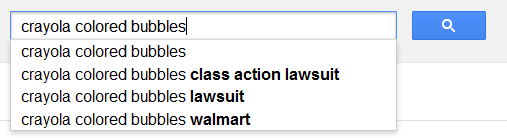
Regularly search for your company name and key product brands to conduct a quick reputation check.
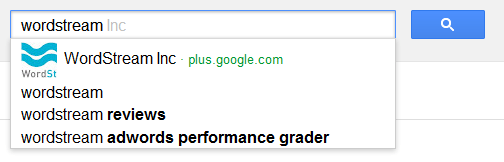
Looks like our online presence is in good shape! However, some suggestions you definitely wouldn’t want associated with your brand include “scam”, “ripoff”, etc. The danger lies in their potential self-reinforcing nature – seeing “scam” next to your brand might lead people to click that suggestion, increasing its search volume. If any autocomplete suggestions raise concern, proactive measures are necessary to counteract the negative trend.
The Lighter Side: Embracing the Humor of Autocomplete
Beyond their practicality for users and marketers, Google’s search suggestions offer a good laugh!
For example:
- 20 Bizarre Google Search Suggestions (“do midgets have night vision”; “what is it called when a giraffe swallowed a toy jet”)
- 25 Funny Google Search Suggestions (“chuck norris can blow bubbles with beef jerky”)
- The most insane search suggestions ever seen on Google (“is it wrong to sleep with your step dad after your mom dies”)
- 100 Inexplicably Funny Google Search Result Suggestions (“google is evil”? looks like they don’t police their own brand suggestions)
- The Autocomplete Me Category on the FAIL Blog (“how to raise your IQ by eating gifted children”)
What’s the most outrageous Google suggestion you’ve encountered?