I was blind, and now I can see! Hopefully, that’s how you’ll feel after reading this article. Okay, maybe not quite that dramatic, but these three tools will likely simplify your Google Ads campaign management, boosting your results. Let’s dive in.
1. Auction Insights
Google provides numerous tools for campaign planning and management. However, regarding evaluating your competition, native tools are scarce, despite competitor analysis being crucial. Auction Insights is one of the few tools available, and using it regularly can significantly enhance your ad spend’s effectiveness. It enables campaign comparisons with competitors, highlighting strengths, weaknesses, and untapped opportunities. (Click here to view larger.)
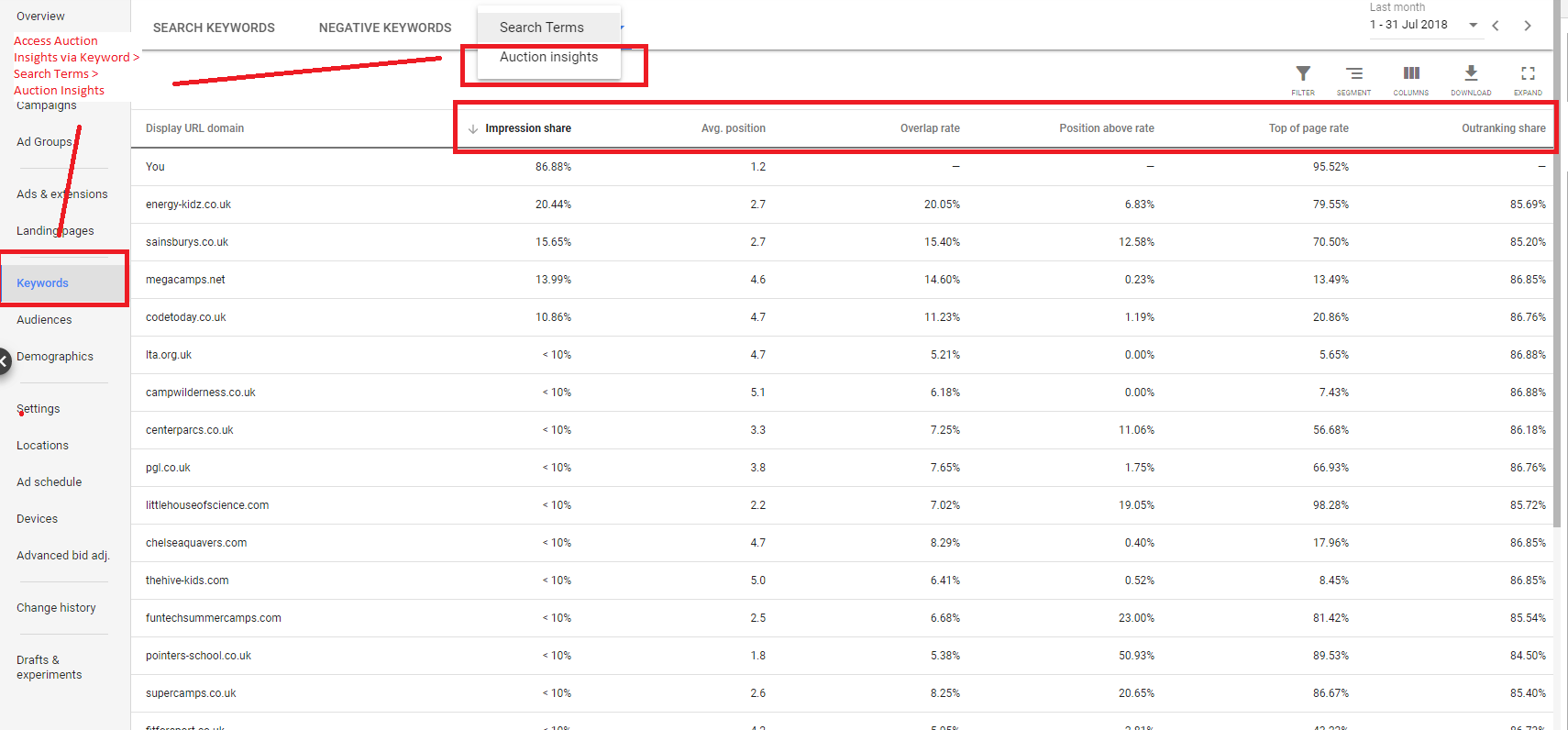
Compare your campaign to competitors using six KPIs:
- Impression Share: How often your ad appears in auctions.
- Average Position: Your ad’s average ranking.
- Overlap Rate: How often another advertiser’s ad appears in the same auction as yours.
- Position Above Rate: How often a competitor’s ad ranks higher than yours when both appear simultaneously.
- Top of Page Rate: How often your ad (or a competitor’s) appears at the top of search results.
- Outranking Share: How often your ad outranks a competitor’s or appears when theirs doesn’t.
Understanding Auction Insights Data
Auction Insights offers campaign insights, improvement areas, and competitive landscape analysis:
- Estimate competitor spending based on impression share. For example, if your share is 50% and a competitor’s is 75%, they might be spending 50% more. While factors like Quality Score and max bids exist, it’s a helpful indicator.
- Quickly assess your campaign setup using average positions. In the screenshot, the 1.2 average position suggests your campaign outperforms most competitors (pointers-school.co.uk being the second-best).
- Identify main competitors through the overlap rate. For instance, energy-kids.co.uk frequently appearing alongside your ads suggests they target similar auctions.
- Spot competitor campaigns outperforming yours using the Position Above Rate. Here, pointers-school.co.uk’s ads outrank yours over half the time when both appear simultaneously. For more on Auction Insights, see this post or this. Note: Auction Insights only applies to Google Search Network and Shopping campaigns. For Shopping campaigns, it only provides Impression Share, Outranking Share, and Overlap Rate.
2. Drafts & Experiments
This underutilized Google Ads tool can significantly boost your ROI. Drafts & Experiments lets you A/B test ads, experimenting with variables like:
- Bid strategies
- Landing pages
- Keyword matching options
- Ad copy
- New keywords
Why Use Drafts & Experiments?
Split testing offers many advantages, with two being particularly valuable:
- Test new campaigns without impacting your main campaigns’ performance.
- Safely test new elements like landing pages, minimizing risk by allocating a small portion of ad traffic. This screenshot illustrates Drafts & Experiments’ power (click here to view larger):
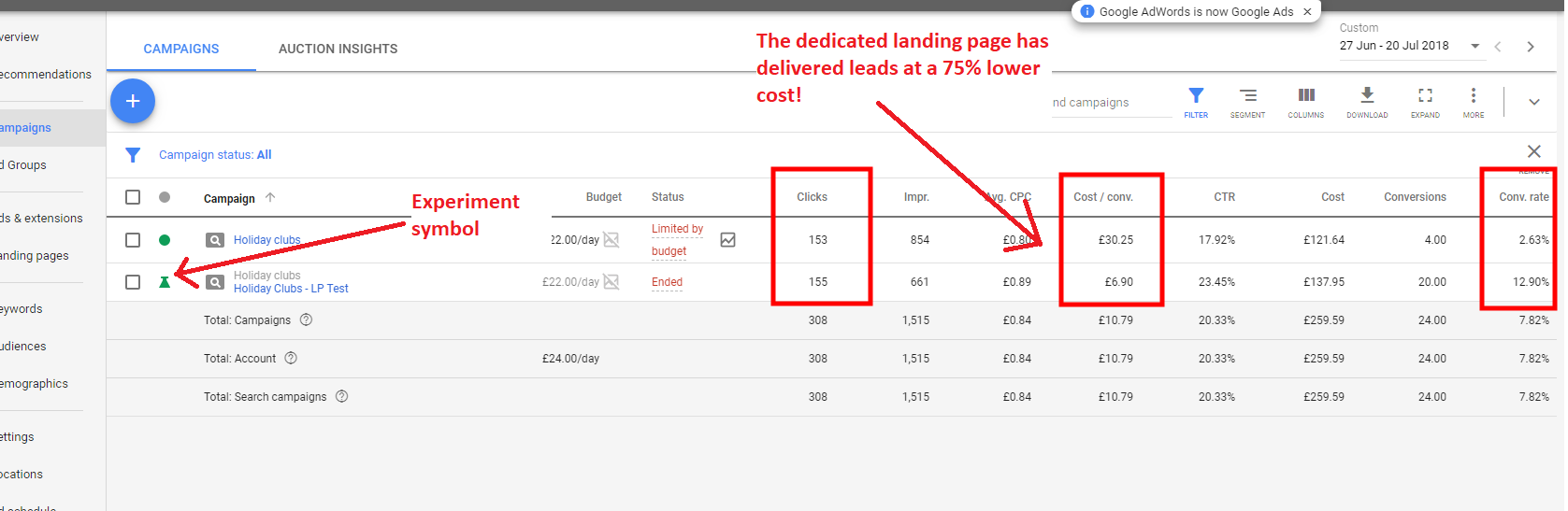
A landing page test revealed a 500% higher conversion rate and 75% lower cost/conversion! Over six months, this small experiment could save you thousands! Drafts & Experiments limitations:
- Limited to Google Search and Display campaigns.
- Excludes Shopping campaigns, App installs, and YouTube.
- Shared budgets are not supported.
- Original campaign changes don’t reflect in experiments.
- Automated bid strategies are not allowed.
- You can only stop a running experiment, not pause it.
- Previous experiments can’t be reactivated; you must recreate them.
Ready to Try?
Excited to run your experiment? Wait, there’s more! Keep these guidelines in mind:
- On a limited budget, split traffic 50/50 to accelerate statistically significant results.
- Prioritize testing crucial elements like landing pages and bidding strategies (separate campaigns) – usually ideal for small to medium businesses.
- Test one variable per campaign; it’s not designed for multivariate testing.
- If your KPI isn’t conversion-related, define it before starting the campaign.
3. Google Ads Scripts
Our final tool, Scripts, can significantly reduce workload and is often underused. Scripts are JavaScript code sets automating campaign aspects. Basic coding knowledge is enough, and once you implement one script, adding more becomes easier. Common Scripts uses in Google Ads:
- Simplify one-time, time-consuming tasks like renaming campaigns across accounts or updating bids on all keywords.
- Eliminate copy-pasting by exporting data from Google Ads to Google Sheets or Excel.
- Create alerts for crucial checks like landing page functionality or keyword conflicts (e.g., negative keywords blocking important ads).
- Automate tasks. Need to pause campaigns upon reaching a budget threshold? No problem! For a beginner-friendly Scripts guide and collection, check out nexus-security’s post here. For agencies managing multiple client accounts, dedicated scripts for MCC are available. What are you waiting for? Learn about three more Google Ads features:
- Google Ads Insights Page
- Google Ads auto-apply recommendations
- Google Ads monthly spend limits