A common suggestion for optimizing websites for search engines is to run a test pay-per-click (PPC) campaign to gather preliminary information about what people are searching for. Analyzing PPC data can offer valuable insights for improving organic search rankings.
Google Ads, previously known as Google AdWords, provides a wealth of data. However, the abundance of options and data points can be overwhelming, especially for small businesses. Many individuals unfamiliar with PPC may struggle to find the most useful information. While there’s considerable overlap between PPC and SEO data, not everything in a Google Ads account is beneficial for SEO, and some data can even be misleading when applied to organic search efforts.
This article will guide you through 25 specific elements within a Google Ads account that SEO professionals and inbound marketers can utilize to optimize for organic search marketing.
1. Segments
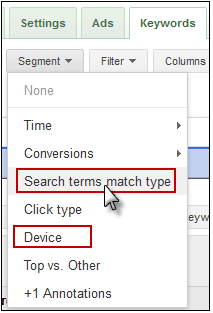
Segments in Google Ads allow you to add extra layers of data to your view. Some segments particularly useful for SEO include:
- Search Terms Match Type: Discover how different match types perform for various keywords. This can reveal insights into the effectiveness of head terms versus long-tail keywords. For instance, if a high-traffic keyword generates conversions and traffic for the exact match but not for broad or phrase match versions, it might indicate a limited long-tail search volume, potentially impacting your overall strategy.
- Devices: While analytics can provide a general idea of mobile traffic, applying a device segment reveals the proportion of PPC conversions from mobile devices and their cost-effectiveness. You might uncover a successful mobile PPC campaign with a dedicated landing page experience that could be replicated for SEO.
2. Filters
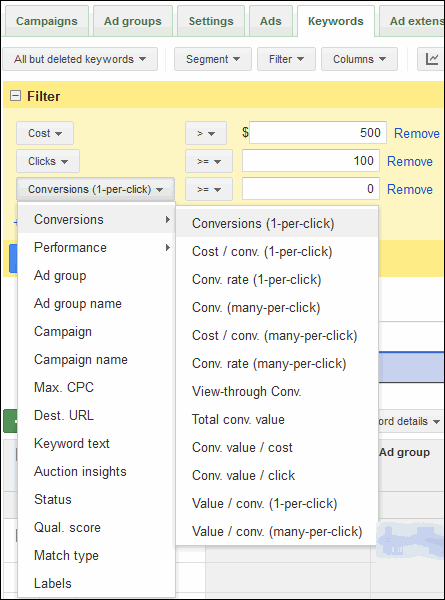
Similar to Excel, Google Ads allows you to create filters to highlight specific data points. For example, you could filter for high-traffic, high-cost keywords that don’t convert. This helps identify popular terms from your SEO research that might not be converting well, allowing you to refine your SEO strategy accordingly.
3. Click-Through Rate (CTR) on Ads
Analyzing click-through rates for specific ads reveals which headlines and descriptions are most effective in attracting clicks. You can then apply this knowledge to your title tags, on-page headings, and meta descriptions.
4. Click-Through Rate (CTR) on Keywords
Examining click-through rates for keywords within your accounts identifies terms where the ad copy aligns well with search intent. Leverage this information to optimize the messaging in your title tags and meta descriptions for targeted keywords on specific pages.
5. Keywords with High Average Cost Per Click (CPC)
By identifying keywords with the highest average cost per click (different from Max CPC), you can pinpoint competitive and potentially valuable terms. These are keywords that your PPC team deems worthy of significant investment. Investigate why they’re paying a premium for these terms. They might be driving cost-efficient conversions or generating high-quality leads.
6. Keywords with a Large Number of Impressions
Keywords with high impressions warrant further investigation. If impressions, clicks, and conversions are all high, the keyword is likely valuable for ranking. However, if impressions are high but clicks are low, analyze the search engine results page (SERP) to understand why. It might be a term better suited for an informational SEO approach or link bait.
7. High Quality Score, High Volume Keywords
In Google Ads, Quality Scores primarily depend on click-through rate, but keyword relevance to ad copy and landing page also play a role. Keywords with high Quality Scores, significant traffic, and conversions deserve attention. Study the ad text, keyword, and landing page relationships that contribute to these high scores to understand what’s working well.
8. Text Ad Copy
Analyzing click-through rates and Quality Scores can reveal effective ad headlines. This information informs your title tag optimization and provides insights into messaging that resonates with your target audience. For example, if “Try it Free Today” CTAs outperform “Learn More” CTAs, incorporate that language into your website offers.
9. Banner Ad Performance
Examining successful and unsuccessful ad creative within your display network campaigns offers insights into messaging that resonates (or doesn’t) with potential customers.

10. Destination URLs
The Google AdWords destination URL report identifies high-converting URLs and landing pages. This valuable information allows you to analyze and replicate successful elements from those pages in your SEO efforts. Consider aligning the templates of your SEO pages with high-converting PPC landing pages.
11. Conversion Value
Understanding conversion metrics within Google Ads is crucial. Conversion value reflects the assigned value to each conversion, such as sales for e-commerce or a dollar value for leads in B2B. This metric is essential because the revenue and business value of conversions can vary (e.g., a sale holds higher value than a newsletter sign-up).
12. Conversion (1-Per-Click)
Conversion 1-per-click represents unique conversions attributed to a campaign, ad group, keyword, etc. If someone clicks your ad for “cat food,” signs up for your newsletter, and later buys cat food, it counts as one 1-per-click conversion, even though they took two actions.
13. Conversion (Many-Per-Click)
Conversely, Conversion Many-Per-Click encompasses the total conversions from a specific element. In the example above, it would be two many-per-click conversions – one for the newsletter sign-up and one for the cat food purchase.
14. Conversion Value / Click
This metric helps identify the most valuable traffic sources. Keywords with high conversion value per click might be worth pursuing even with lower traffic volumes.
15. Conversion Value / Cost
Analyzing conversion value / cost reveals opportunities for high-value conversions despite higher PPC costs. A high ratio may indicate valuable traffic in a less competitive keyword vertical. Remember, competition for commercial terms often correlates between PPC and SEO.
16. Placements
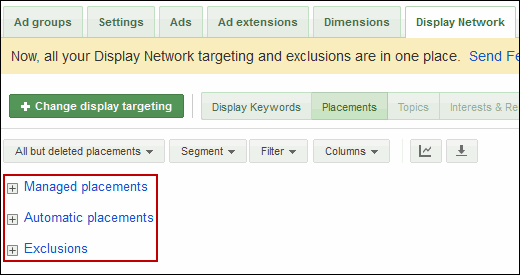
Placement data in Google Ads is invaluable for SEO. You can discover outreach and link-building opportunities. By examining managed placements (individually bid placements), automatic placement performance, and exclusions, you gain insights into websites driving conversions and quality traffic, informing your content marketing strategies. Discussing successful and unsuccessful placements with the PPC manager can provide additional valuable insights.
17. Retargeting
Search retargeting can amplify your SEO efforts, and data sharing in this area is invaluable.
18. Interest / Demographic Data
The “Interests & Remarketing” section within the display tab, specifically the “Topics” subsection,

provides insights into the performance of content categories, remarketing segments (e.g., recent purchasers, shopping cart abandoners), and interest categories (based on user browsing history). This data helps understand the types of prospects most likely to convert, enabling you to tailor content and target keywords accordingly.
19. Keyword Tool
While SEOs are familiar with the Google Ads Keyword Tool, logging into your Google Ads account provides customized results based on your website and account data, potentially uncovering new keyword ideas.
20. Traffic Estimator
This tool estimates click, impression, and cost metrics for keywords. While your Google Ads data is more accurate, these estimates can provide insights into competition (higher costs often indicate higher competition) and relative search volume.
21. Placement Tool
Even without running display campaigns, the AdWords Placement Tool serves as a link prospecting tool. Similar to the Keyword Tool, it generates relevant sites based on keywords, URLs, or categories. Closely related sites running AdSense ads could be potential link partners.
22. Contextual Targeting Tool
Designed for the display network, this tool suggests keyword groups for display campaigns. While you need to exercise caution when applying these suggestions to SEO, they can spark ideas for keyword themes, either for targeting on a single page or as inspiration for content creation.
23. Opportunities Tab
The Opportunities Tab may not always offer relevant suggestions for your PPC campaigns, but it can highlight keywords not currently targeted. These keywords might be expensive or not directly relevant for PPC but could be valuable for content ideas or less competitive in organic search.
24. Time & Geographic Performance Data
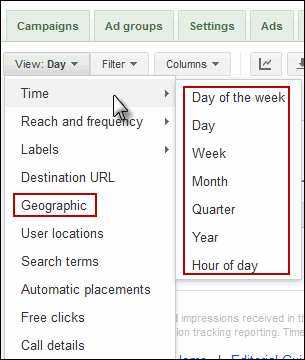
The Google Ads Dimensions Tab provides performance data based on time (day of the week, hour of the day) and geography. This information can inform your content strategy by revealing when prospects are most likely to convert, guiding the timing of content campaigns. It can also highlight local search terms or content opportunities based on geographic performance.
25. Keyword Detail / Search Query Data
With Google limiting access to search query data for SEO, understanding how to extract this information from Google Ads (distinct from Google Ads keywords!) offers valuable insights into actual user searches.
While creativity and logical thinking are crucial to apply Google Ads insights effectively to SEO and content marketing, navigating a Google Ads account and collaborating with the PPC team can unearth valuable data to enhance your organic search efforts.