Transferring existing data is a challenge.
Many companies rely on outdated and intricate on-premise Customer Relationship Management (CRM) systems for their business operations. Today, numerous cloud-based Software as a Service (SaaS) options offer advantages such as pay-as-you-go models and usage-based billing. This leads companies to transition to these modern systems.
Naturally, businesses want to retain valuable customer data from their old systems and avoid starting fresh. This is where data migration comes in. However, data migration is a complex process, with around 50 percent of deployment effort being a significant factor in its activities. According to Gartner, Salesforce is a leading cloud CRM solution, making data migration a crucial aspect of Salesforce implementation.
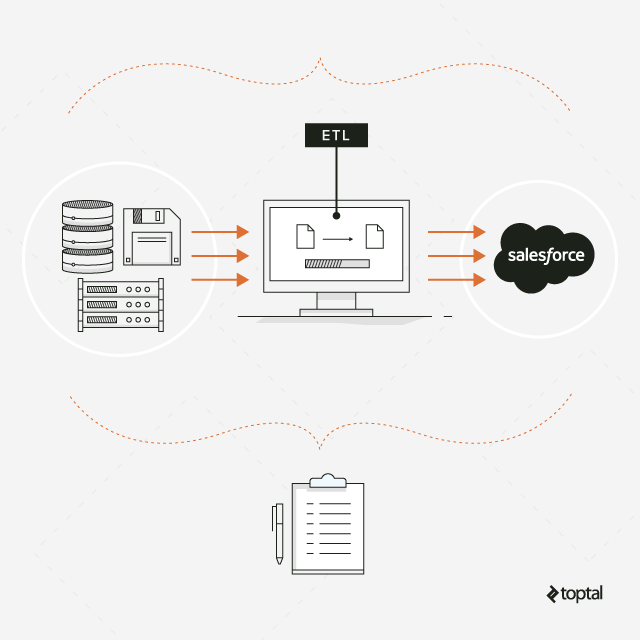
while preserving all history.
The question then becomes: How can we guarantee a smooth and complete transfer of legacy data to a new system while preserving its historical context? This article presents ten valuable tips for successful data migration. The initial five tips are universally applicable, regardless of the technology employed.
General Data Migration Principles
1. Treat Migration as a Separate Project
Data migration is not a mere “export and import” task on a software deployment checklist, nor is it a simple “push-button” operation with predefined mappings for target systems.
It’s a complex endeavor that necessitates its own dedicated project, complete with a plan, approach, budget, and team. Defining the scope and plan at the project’s outset, encompassing all entities, is crucial to avoid unexpected issues, such as realizing you forgot to migrate specific client reports just weeks before the deadline.
The chosen data migration strategy dictates whether the data will be transferred in one batch (known as the “big bang” approach) or in smaller increments over time.
This decision carries significant weight and should be communicated transparently to all stakeholders, both technical and business-oriented. This ensures everyone understands the timeline for data availability in the new system and any potential system downtimes.
2. Realistic Estimation is Key
Never underestimate the complexity inherent in data migration. Numerous time-intensive tasks are involved, many of which might not be apparent at the project’s start.
Consider, for instance, the need to load specific datasets for training, ensuring they contain realistic yet anonymized data to avoid triggering email notifications to actual clients.
The fundamental factor influencing estimation is the number of fields requiring transfer from the source system to the target.
Each field demands time allocation across various project stages, including analysis, mapping, transformation configuration, testing, data quality assessment, and more.
Utilizing sophisticated tools such as Jitterbit, Informatica Cloud Data Wizard, Starfish ETL, or Midas can optimize this process, particularly during the development phase.
However, understanding the source data, a critical aspect of any migration, cannot be automated. It mandates dedicated time for analysts to meticulously review each field.
A straightforward estimation rule of thumb is to allocate one person-day per field being migrated from the legacy system.
An exception to this rule is data replication scenarios involving identical source and target schemas without transformations (often called 1:1 migration). Here, the estimation can be based on the number of tables being copied.
Crafting a comprehensive estimate is an art in itself.
3. Data Quality Assurance
It’s crucial to avoid overestimating the quality of your source data, even if no issues have been reported within the legacy system.
New systems come with new rules, which your existing data may not adhere to. For example, while the new system may require a contact email, an older system might not.
Historical data, often left untouched for years, can harbor hidden issues that surface during migration. For example, data using obsolete currencies may need conversion, or the new system may need to be updated to accommodate these currencies.
Data quality significantly influences the overall effort. A simple rule applies: The deeper you delve into history, the greater the potential for complications. Therefore, it’s vital to determine early on the extent of historical data you intend to migrate.
4. Active Business Involvement
Business users possess the deepest understanding of the data and are best positioned to determine what’s disposable and what’s essential.
Having a representative from the business team participate in the mapping process is crucial. Documenting mapping decisions and their rationale facilitates future reference.
Once a test batch of data is loaded into the new system, it’s invaluable to have the business team examine it.
Surprises may still arise even after thorough reviews and approvals of data mapping, as visualizing the data within the new system’s interface can reveal unforeseen issues.
The phrase “Now we see, we need to adjust this” often emerges at this stage.
Failure to involve subject matter experts, who are often occupied with other responsibilities, is a common culprit for post-launch challenges.
5. Strive for Automation
Data migration is often perceived as a one-time event, leading developers to create solutions reliant on manual interventions, assuming they’ll only execute them once. However, several reasons necessitate avoiding such an approach.
- If migration is divided into multiple phases, these manual actions must be repeated.
- Typically, each wave involves at least three migration runs: a dry run to assess performance and functionality, a full validation load for comprehensive data testing and business validation, and the final production load. Poor data quality necessitates further iterations for improvement, increasing the number of runs.
Therefore, despite its inherent one-time nature, manual interventions can significantly hinder operations.
Salesforce Data Migration Specifics
The next five tips specifically target successful Salesforce migration. However, these principles likely hold relevance for other cloud-based solutions as well.
6. Anticipate Prolonged Load Times
Performance often emerges as a major tradeoff when transitioning from on-premise to cloud solutions, including Salesforce.
On-premise systems usually allow direct data loading into their databases. With adequate hardware, achieving millions of records processed per hour is attainable.
This, however, is not the case in the cloud. Several factors impose limitations in cloud environments.
- Network latency – Data transfer occurs over the internet.
- Salesforce application layer – Data traverses a complex API multitenancy layer before reaching their Oracle databases.
- Custom code in Salesforce – Custom validations, triggers, workflows, duplication checks, and other customizations can hinder parallel or bulk loads.
Consequently, load performance may be reduced to thousands of accounts per hour.
The actual rate can fluctuate based on factors like the number of fields, validations, and triggers involved, but it will generally be significantly slower compared to direct database loads.
Furthermore, as the volume of data in Salesforce grows, performance degradation becomes a concern.
This degradation stems from indexes employed by the underlying RDBMS (Oracle) for enforcing foreign key relationships, unique constraints, and duplicate rule evaluations. A general guideline is a 50% slowdown for every tenfold increase in data volume due to the logarithmic time complexity associated with sorting and B-tree operations (O(log N)).
Salesforce also enforces various resource usage limits.
One such limit is the restriction on Bulk API limit set to 5,000 batches within a 24-hour rolling window, with a maximum of 10,000 records per batch.
Theoretically, this translates to a maximum of 50 million records loaded in 24 hours.
In real-world scenarios, this maximum is considerably lower due to limitations imposed on batch sizes, particularly when custom triggers are involved.
These factors significantly impact the chosen data migration approach.
For datasets of even moderate size (ranging from 100,000 to 1 million accounts), the big bang approach becomes impractical. Instead, the data must be divided into smaller, manageable waves for migration.
This segmentation influences the entire deployment process and adds complexity, as data increments are introduced into a system already populated with data from previous migrations and user entries.
Migration transformations and validations must consider this existing data.
Moreover, extended load times may preclude performing migrations during system outages.
If all users are located within a single time zone, an eight-hour nighttime outage might be feasible.
However, for globally distributed companies like Coca-Cola, this becomes impossible. With users spanning multiple time zones, Saturday emerges as the only viable outage window that minimizes user impact.
And even that might not suffice, necessitating online data loading while the system is actively used.
7. Design Applications with Migration in Mind
Application components such as validations and triggers should accommodate data migration activities. Disabling validations entirely during migration is not an option if the system needs to remain online. Instead, implement logic within validations to differentiate between changes made by migration users and regular users.
- Avoid comparing date fields with the current system date, as this hinders the loading of historical data. For instance, allow past account start dates for migrated data.
- Implement mandatory fields, which historical data might lack, as non-mandatory during migration. However, enforce these fields for regular users accessing the system through the user interface.
- Triggers, particularly those generating new records for integration purposes, should be togglable for migration users. This prevents overwhelming the integration with migrated data.
Another useful technique is incorporating a “Legacy ID” or “Migration ID” field within each migrated object. This serves two purposes: First, it preserves the ID from the old system for traceability. Users often continue to search for accounts using old IDs found in emails, documents, or bug-tracking systems even after migration. While potentially a bad habit, retaining these IDs enhances user experience. Second, it addresses the technical limitation in Salesforce where explicitly provided IDs for new records are not accepted (unlike in Microsoft Dynamics). Salesforce generates its own IDs during loading. This presents a challenge when loading child objects, as their parent object IDs are unknown until after the parent objects are loaded.
Let’s illustrate this using Accounts and Contacts:
- Generate data for Accounts.
- Load Accounts into Salesforce. New IDs are generated.
- Update Contact data with the newly generated Account IDs.
- Generate data for Contacts.
- Load Contacts into Salesforce.
This process can be streamlined by loading Accounts with their Legacy IDs stored in a dedicated external field. This field can then be used as a parent reference when loading Contacts:
- Generate Account data, including Legacy IDs.
- Generate Contact data, including Account Legacy IDs.
- Load Accounts into Salesforce.
- Load Contacts into Salesforce, referencing the Account Legacy ID for parent association.
This approach decouples generation and loading, enabling greater parallelism, reducing outage windows, and improving efficiency.
8. Understand Salesforce’s Nuances
Salesforce, like any system, has its quirks. Being aware of these nuances helps avoid unwelcome surprises during migration. Here are a few examples:
- Certain modifications to active Users can trigger automatic email notifications. To work with user data, deactivate users before making changes and reactivate them afterward. In testing environments, scramble user emails to suppress notifications. Since active users consume licenses, it’s impractical to have all users active in all test environments. Manage subsets of active users, activating only those required for specific purposes (e.g., training).
- Assigning inactive users to standard objects like Accounts or Cases requires the “Update Records with Inactive Owners” permission. However, they can be assigned to Contacts and custom objects without this permission.
- Deactivating a Contact silently enables all opt-out fields.
- Loading duplicate Account Team Member or Account Share records silently overwrites existing records. However, loading duplicate Opportunity Partners simply creates additional records, resulting in duplicates.
- System fields like
Created Date,Created By ID,Last Modified Date, andLast Modified By IDcan only be explicitly set after enabling the “Set Audit Fields upon Record Creation” permission. - Migrating historical field value changes is not supported.
- Owners of knowledge articles cannot be specified during the load but can be updated later.
- Storing content (documents, attachments) in Salesforce presents its own set of challenges. Multiple methods exist (Attachments, Files, Feed attachments, Documents), each with advantages and disadvantages, including varying file size limits.
- Picklist fields restrict user input to predefined values. However, when loading data using the Salesforce API (or tools built upon it, such as Apex Data Loader or Informatica Salesforce connector), any value will be accepted.
These are just a few examples. The key takeaway is to invest time in understanding the system’s capabilities and limitations before making assumptions. Don’t assume standard behavior, especially for core objects. Thorough research and testing are essential.
9. Avoid Using Salesforce as a Migration Platform
While tempting, especially for Salesforce developers, using Salesforce itself as the platform for building your data migration solution is a flawed approach. While it offers familiarity with the technology, interface, Apex programming language, and infrastructure, and Salesforce has objects that function like tables and a SQL-like language (Salesforce Object Query Language (SOQL)), it’s not designed for this purpose.
Salesforce excels as a SaaS application with strong collaboration and customization features. However, mass data processing is not its forte. Three key reasons discourage this approach:
- Performance Limitations: Data processing within Salesforce is significantly slower compared to dedicated RDBMS systems.
- Analytical Shortcomings: Salesforce’s SOQL language lacks support for complex queries and analytical functions, forcing reliance on Apex code, which further impacts performance.
- Architectural Drawbacks: Placing a data migration platform within a specific Salesforce environment introduces dependencies on its connectivity and availability. Managing code synchronization across multiple environments, often created ad hoc, becomes cumbersome.
Instead, opt for a separate instance (cloud-based or on-premise) to host your data migration solution. Utilize an RDBMS or ETL platform, connect it to your source systems, and target the desired Salesforce environments. This allows you to:
- Harness the full potential of SQL or ETL features.
- Centralize code and data, enabling cross-system analysis. Combine configurations from the latest test environment with real production data for comprehensive insights.
- Reduce dependency on source and target system technologies, enhancing solution reusability for future projects.
10. Maintain Salesforce Metadata Oversight
At the onset of a project, you typically acquire a list of Salesforce fields and initiate the mapping process. However, new fields may be added, or existing field properties might change during the project lifecycle. While you can request notifications from the development team regarding such changes, a more reliable approach is to actively monitor these modifications.
A common practice is to periodically download migration-relevant metadata from Salesforce into a dedicated repository. This repository not only facilitates change detection but also allows for comparisons between data models across different Salesforce environments.
Essential metadata to download:
- List of objects with labels, technical names, and attributes like “creatable” and “updatable.”
- List of fields with their attributes. It’s best to retrieve all attributes.
- List of picklist values for each picklist field, essential for data mapping and validation.
- List of validations to ensure new additions don’t conflict with migrated data.
While no standard metadata retrieval method exists within Salesforce, several options are available:
- Generate Enterprise WSDL: Access the
Setup / APImenu within the Salesforce web application and download the “Enterprise WSDL” file, which provides a detailed description of objects and fields but excludes picklist values and validations. - Utilize the
describeSObjectsweb service, either directly or through Java or C# wrappers (refer to Salesforce API). This method provides the required information and is the recommended approach for metadata export. - Explore various third-party tools available online.
Gearing Up for Your Next Data Migration
Cloud solutions like Salesforce offer instant accessibility. If the built-in functionalities meet your needs, simply log in and start using them. However, keep in mind that Salesforce, similar to other cloud CRM solutions, presents unique challenges for data migration, particularly related to performance and resource limitations.
Migrating legacy data is an adventure, often a journey through historical data spanning years. This article, drawing from experiences across numerous migration projects, presents ten essential tips to navigate this process successfully and avoid common pitfalls.
The key lies in understanding your data’s story. Before embarking on data migration, ensure your Salesforce development team is prepared for potential challenges your data might hold.