Managing paid search marketing can often seem like a daunting task, especially for local business owners already juggling numerous responsibilities. Balancing the constant need to adapt to the quickly changing digital landscape during a pandemic with daily operations can leave many feeling too drained or stretched to learn the ins and outs of online advertising platforms independently.
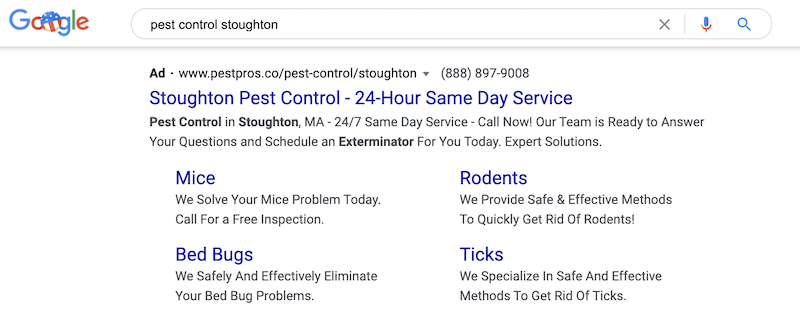
This post offers advice on crafting a Google Ads strategy tailored for your local business. We’ll explore:
- Expert suggestions for structuring your Google Ads account, using ad extensions, and optimizing landing pages.
- Tools for pinpointing the best conversion tracking methods, conducting effective keyword research, and reaching the right audience.
- Additional strategies for getting the most out of your Google Ads budget.
Whether you’ve experimented with Google Ads, are ready to launch your first campaign, or are an agency seeking to assist a local client, this post will provide you with the insights, tools, and best practices you need to succeed.
10 Keys to Successful Google Ads for Local Businesses
Executed well, local advertising on Google is a highly effective way to draw in customers from your area and achieve your business goals. Let’s explore how to make that happen.
1. Consider a SKAG Account Structure
It’s crucial for any advertiser to have a firm grasp on the “why” behind investing in paid marketing. While it might seem obvious, I frequently encounter businesses that believe they must or should run ads without a clear objective in mind. The answer to this question, whether for one campaign or several, is crucial when structuring your account.
For many local businesses, the primary motivation for starting is often to increase foot traffic or online orders, but these goals need further refinement. If you’re ready to invest in specific keywords, you need corresponding goals for those ad groups. I advocate for a Single Keyword Ad Group (SKAG) structure. This allows for highly focused campaigns and keyword ad groups, which you can then refine by match type. Here’s a visual representation:
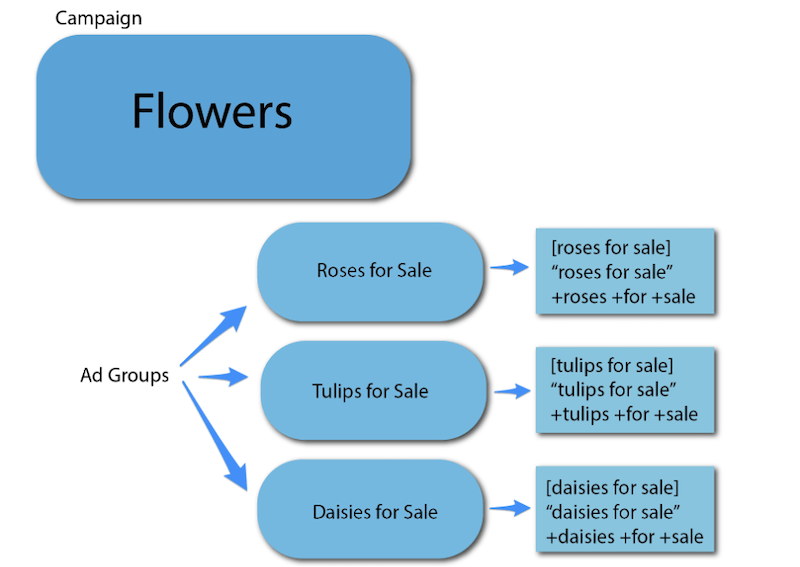
When managing a paid search campaign targeting local searches, this account structure is very effective. It lets you be extremely precise with your targeted terms and the ads shown to those groups. As with any business running PPC ads, relevance is paramount. For instance, a local pizza place could have this campaign structure: Campaign: Pizza Ad Group: Pizza Near Me Keywords: “pizza near me” [pizza near me] +pizza +near +me
2. Track Conversions with Google Tag Manager
A critical yet potentially challenging aspect of paid advertising is conversion tracking. For those new to the dynamic world of digital marketing, conversions are the actions you want users to take after clicking your ad. For example, if an ad leads a user to a webpage with a signup form and they submit their information, that’s a conversion. For businesses like eateries or florists, it could be a completed order or reservation. Setting this up can be tricky for those with limited web development skills. The simplest method is integrating Google Tag Manager into your website. Tag Manager simplifies the creation of desired events precisely where you need them.
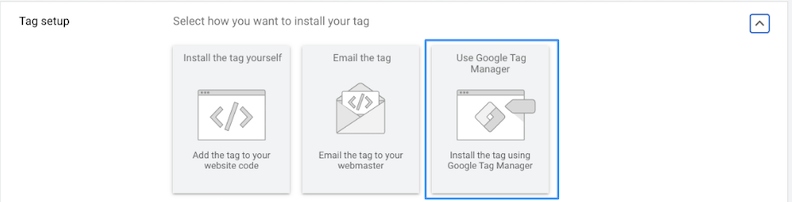
For instance, to boost food orders, create a conversion action on the order confirmation page. Some advanced options for such businesses involve assigning conversion values to purchases. This lets you send the cart value back to Google, revealing the return on investment from your advertising. This deeper level of analysis helps you identify your most profitable campaigns, allowing you to confidently allocate your budget based on average conversion rates. RELATED: 7 Tips to Improve Your Google Local Services Ads ROI Now
3. Set Up Call Extensions
It’s safe to say most local businesses benefit from providing a phone number, especially in paid ads. Adding call extensions to your ads is straightforward. Choose the campaign you want to add it to and select “Ads and Extensions” from the left-hand menu:
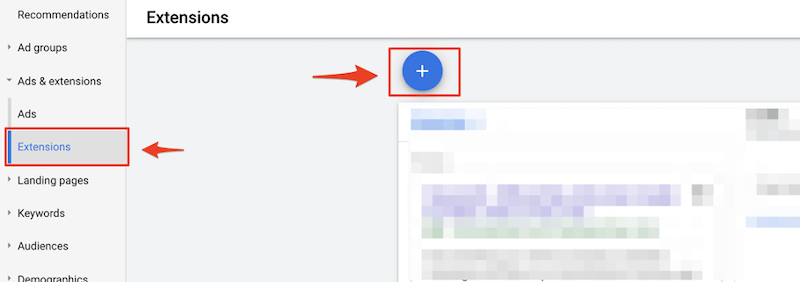
Click on “Extensions,” then the plus sign to the right.
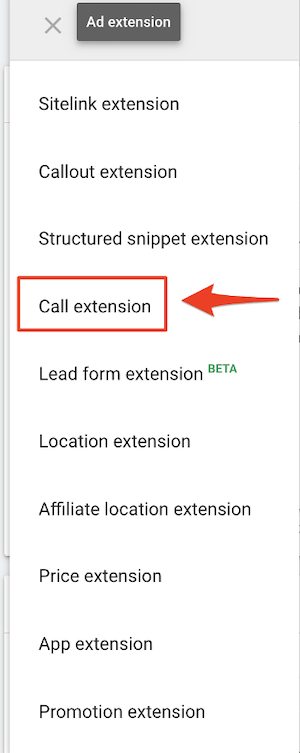
Next, choose “Call Extension.”
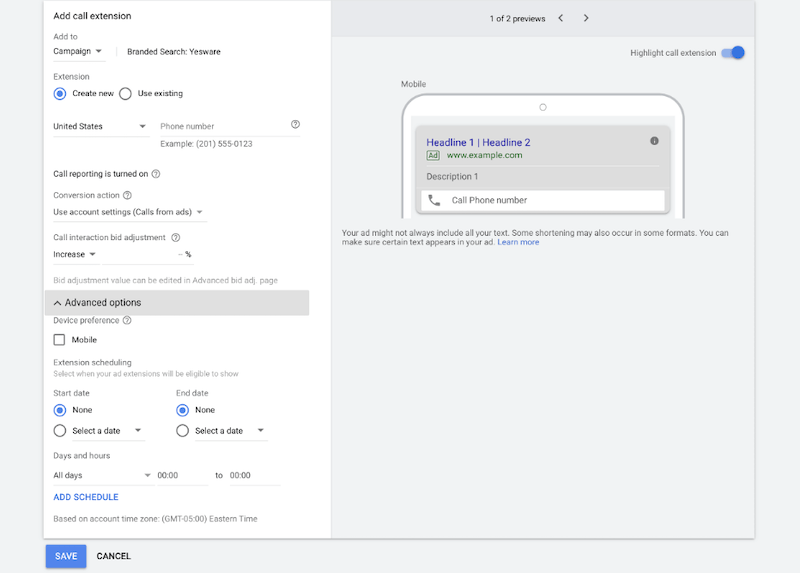
You can now add your business phone number to your ads. This serves as an extension, providing an alternative for users to call directly instead of visiting your website:
You can also schedule your call extension to align with your business hours. This way, the extension can be hidden when you’re closed.
4. Fine-Tune Your Targeting
Targeting is a fundamental aspect of any paid strategy. It’s particularly vital for local businesses, as you’ll want to connect with an audience near your physical location(s). To modify location settings, select the campaign you’d like to edit, then click on “Locations” in the left-hand menu:
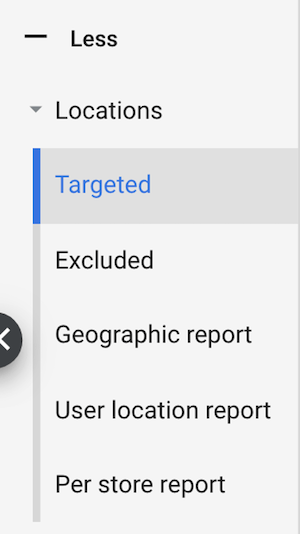
Under “Targeted,” choose specific regions or set radiuses:
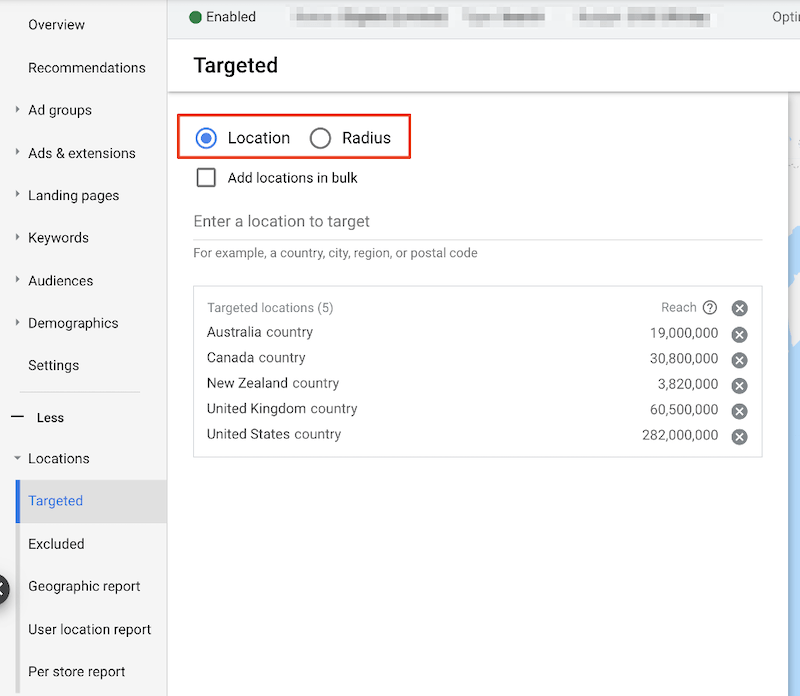
You can target a region directly or by radius. If you have multiple physical stores, set a defined radius around each to attract search traffic within a practical distance. One often-overlooked setting is found within the location setup for your campaign. Select your campaign and navigate to the campaign settings to view the target locations:
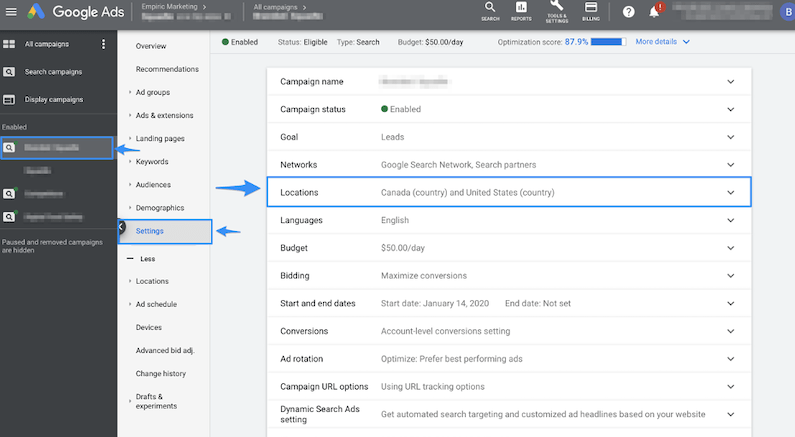
Expand “Locations” to reveal the targeting specifics:
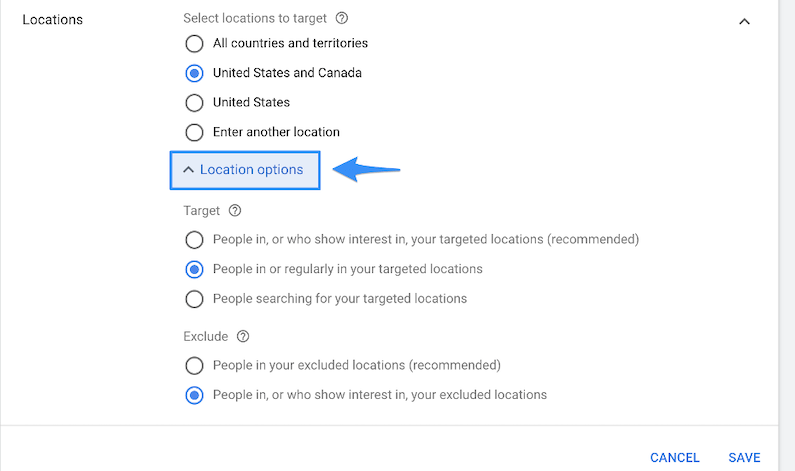
From there, expand “Location Options” and select “People in or regularly in your targeted locations.” This ensures you’re only targeting individuals physically searching within your chosen radius.
5. Sync Your Offer with Targeted Queries and Core Advertising Objectives
Many marketers struggle to choose which promotion to feature in their paid ads. Fortunately for local businesses, the search terms you’re bidding on can guide this decision. For instance, if you’re targeting “pizza near me,” direct traffic to a page where users can order pizza. If you’re targeting “flower shops near me,” your homepage, showcasing general information and testimonials, is a good choice. However, the same business could target “roses for sale near me” and send traffic to a dedicated rose ordering page. When deciding which promotions to use or keywords to bid on, consider your core objective: generating revenue. Here are two ways to maximize revenue with search ads:
- Determine which product or service naturally generates the most revenue.
- Analyze the monthly search volume for terms related to your products or services. Also, look at the competition and average cost per click for those terms.
6. Utilize Keyword Research Tools
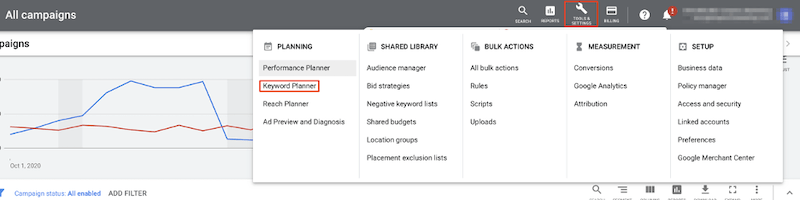
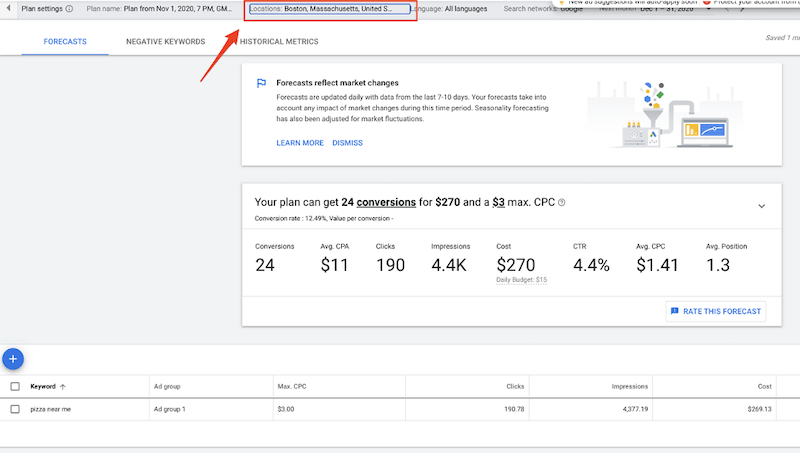
Paid keyword research tools are available, but you can also opt for free options like Google’s Keyword Planner. This tool offers insights into the search volume for your desired keywords and other valuable information. To access Keyword Planner, click the “Tools and Settings” icon in the top right corner of your Google Ads interface. Then select “Keyword Planner” from the menu:
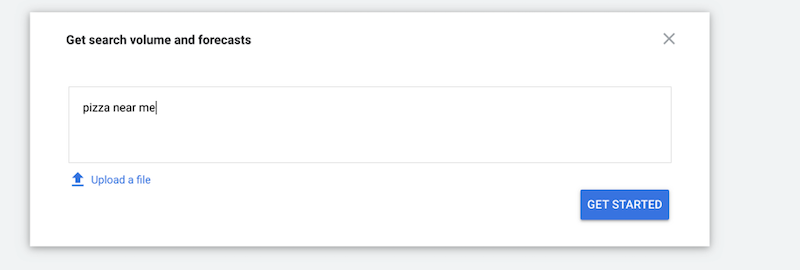
Enter the keyword you want to forecast:
You’ll be taken to a page where you can modify the location(s) for which you want to view keyword volume:
7. Utilize Google Trends
Google Trends lets you analyze how current events (like a pandemic) impact the volume and frequency of specific searches. Simply go to https://trends.google.com/trends/?geo=US Input the query you’re researching and the location:
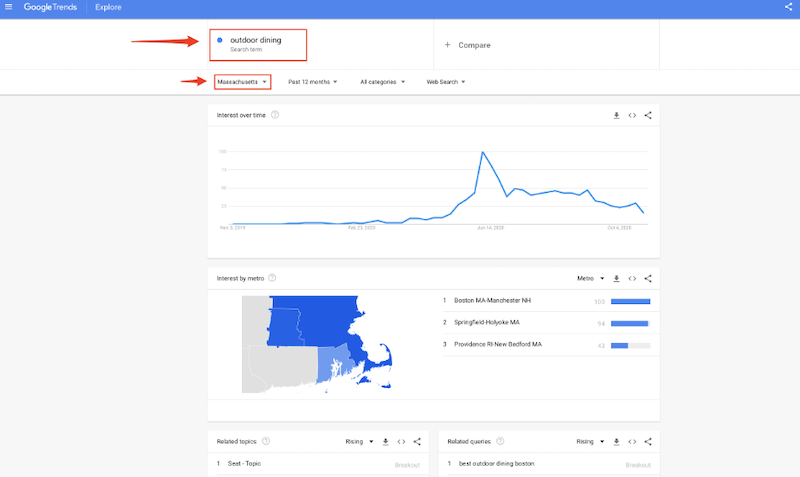
Using the example search and location, we see that searches for “outdoor dining” peaked in July and declined as winter approached in Massachusetts.
8. Ensure Your Website is Organized and Optimized
Paid search is very effective for local businesses if their website is well-structured. The website itself is crucial. Many local businesses may not have prioritized their online presence, but now is the perfect time for an upgrade. The majority of users search for local businesses on their smartphones. Having mobile-friendly landing pages, integrated into your site or as separate, unlinked pages, provides a significant advantage in paid search. Easy-to-navigate mobile landing pages are crucial, not just for conversions but also for your Quality Score. If your landing page is clean and user-friendly, Google will reward you over competitors bidding on the same keywords.
9. Deliver Outstanding Service
Attracting new customers is great, but gaining repeat customers is even better. You can accomplish this through well-optimized Google Ads campaigns. With a finely tuned campaign, single conversions translate into higher profits over time, provided your business excels in what it does. Regardless of your approach, numerous opportunities await your business through local search queries.
10. Think About Outsourcing
Managing Google Ads might feel overwhelming, especially if you’re new to it. Depending on your budget, consider outsourcing. It could be beneficial, particularly if you need initial setup assistance. You can gradually learn paid search without the pressure of immediate revenue generation. Many agencies and freelancers can help you set up or optimize your account. Once your campaign structure, conversion tracking, and promotional strategy are in place, you can scale your ads profitably, boosting revenue beyond traditional word-of-mouth and organic online orders.
Google Ads Optimizations for Local Businesses: Give These a Try
To maximize results and get the most out of Google Ads for your local business, follow these 10 tips:
- Consider a SKAG-based account structure
- Track conversions with Google Tag Manager
- Set up call extensions
- Fine-tune your targeting
- Sync your offer with targeted queries and core advertising objectives
- Utilize keyword research tools
- Utilize Google Trends
- Ensure your website is organized and mobile-friendly
- Deliver outstanding service
- Think about outsourcing